
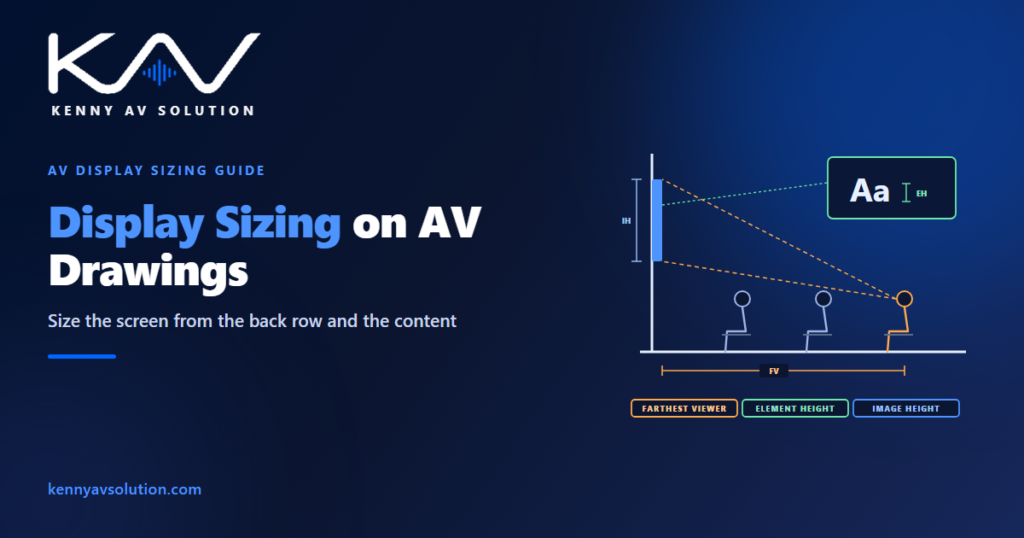
AV display sizing is usually settled by a guess: the room looks like a 75-inch room, or the budget covers an 86-inch panel. Then the drawings are issued, the display is installed, and the people at the back of the room cannot read the spreadsheet. The right size can be worked out, and every number needed to work it out is already on the drawings. The furniture plan fixes how far away the farthest viewer sits. The wall elevation fixes how tall the image is. The missing piece is the content, because what people need to read on the screen matters as much as where they sit.
The method below follows AVIXA’s display image size standard, known as DISCAS (ANSI/INFOCOMM V202.01, first published in 2016; AVIXA has since been revising it, so confirm which edition the project specifies). The figures are illustrative; the standard and the AV designer govern.
Start with the farthest viewer
Every sizing calculation starts with one dimension: the distance from the screen to the farthest viewer, the person who will have the hardest time reading it. Take it from the furniture plan, not from the room size. Measure to the eye position of the last seat that has to read the screen, including seats along the back wall or standing positions if people really use them. Measure to the screen surface, not to the wall behind it.
Draw that dimension on the plan. If the furniture layout is not fixed yet, say so and use the worst case. It is the most important number in the calculation, and when the furniture later moves a metre further back, the drawing shows straight away that the display needs checking again. A site survey confirms it in an existing room.
Then decide what the viewers have to do
DISCAS separates two viewing tasks, and they lead to very different screen sizes.
- Basic decision making (BDM) — viewers need to understand the content, but not see every detail: presentations, documents, spreadsheets and most meeting-room content.
- Analytical decision making (ADM) — viewers need to see every detail the source contains: medical images, engineering drawings, detailed maps, fine data. Any pixel could matter.
Most meeting rooms and classrooms are BDM rooms. Control rooms, review rooms and some specialist spaces include ADM tasks, and if any viewer needs ADM the room should be sized for it.
Basic decision making: the element height sets the size
For BDM, the deciding factor is the element height: the height of the smallest thing on the screen that viewers must read, such as a lowercase letter in the smallest text. DISCAS expresses it as a percentage of the image height, the %EH. A character 32 pixels tall on a 1080-line image is about 3% of the image height.
The BDM relationship is simple: the farthest viewer can sit up to 200 times the element height away. Rearranged for the drawing:
Minimum image height = farthest viewer distance ÷ (200 × %EH)
At 3% that is the farthest viewer distance divided by 6; at 2% it is divided by 4. That is where the old rule of thumb of 4, 6 and 8 times the image height comes from. The rule hides the content assumption. Content with smaller text needs a taller image for the same room, and a room sized for large slide text will fail when someone shares a spreadsheet. Agree the %EH with the client and write it down, rather than leaving it hidden inside a ratio.
Analytical decision making: the resolution sets the size
For ADM, the viewer must be able to see a single pixel. DISCAS bases this on normal 20/20 vision, which resolves about one arcminute, and that gives:
Minimum image height = farthest viewer distance × vertical resolution ÷ 3,438
For a 1080-line image and a farthest viewer at 6 m, that is 6 × 1,080 ÷ 3,438 = 1.88 m of image height — far more than a typical meeting-room display provides. A 4K source has twice the lines, so it needs twice the image height for the same viewer to see every pixel. For detailed work, more pixels means a larger image or viewers sitting closer, not a smaller screen.
One display, four answers
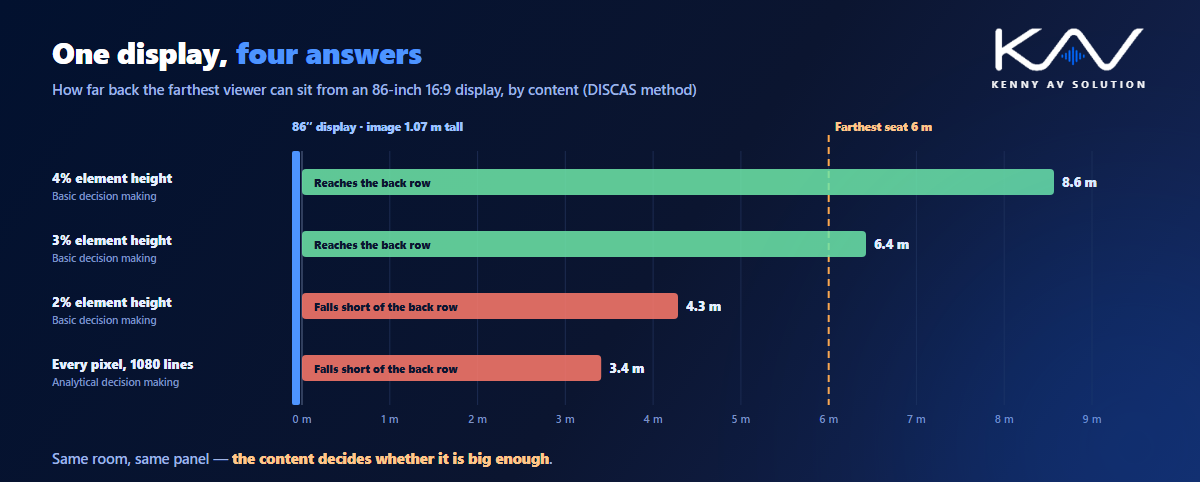
The same display can be right for one kind of content and wrong for another. An 86-inch 16:9 panel has an image height of about 1.07 m. The farthest viewer it can serve depends entirely on the content:
- 4% element height: up to about 8.6 m.
- 3% element height: up to about 6.4 m.
- 2% element height: up to about 4.3 m.
- Every pixel of a 1080-line image (ADM): up to about 3.4 m.
In a room whose farthest seat is 6 m away, that panel is right for content at 3% and wrong for content at 2%. The drawing is the same either way. Only the content assumption changed, which is why it belongs on the drawing.
Turn the image height into a product
Displays are sold by diagonal, but the calculation produces an image height. For a 16:9 image, the diagonal is about 2.04 times the image height. A 1.0 m image height needs about 2.04 m of diagonal, or 80 inches, so the next common size up is 86 inches. Check the active image area on the manufacturer’s data sheet rather than relying on the nominal diagonal.
When the required size is bigger than any practical flat panel, the drawings should show the choice that was made instead of a panel that is too small:
- Move the viewers closer or change the furniture layout.
- Use projection or direct-view LED for larger images; see projector placement and, for large arrays, control room video walls. For direct-view LED, the wall has to be a whole number of cabinets; see LED video wall drawings.
- Add repeater displays for the back of a long room, with their own farthest-viewer check.
- Change the content — larger text, fewer rows — and record the %EH it now has to meet.
Height, angles and the closest viewer
A screen big enough for the back row can still fail the front row. DISCAS also covers the closest viewer and the horizontal and vertical viewing angles, so check the front seats as well as the back. A large screen mounted too high strains the necks of people near it. A wide room puts the outer seats at a sharp angle to the screen.
Set the bottom of the image high enough to clear the heads of seated viewers in front, and show it on the wall elevation with the image height dimensioned. On the plan, draw the farthest and closest viewer positions and the viewing angle lines to the outer seats. A section through the room showing the sightlines makes the vertical check clear to everyone who reviews it.
What the drawings should show
- A basis-of-design note: the standard and edition, the viewing task (BDM or ADM), the agreed %EH or source resolution, and the resulting minimum image height.
- Farthest and closest viewer dimensions on the plan, measured from real seat positions.
- Viewing angle lines to the outer seats.
- A wall elevation or section with the image height, the height to the bottom of the image and the sightlines dimensioned.
- A display schedule with the diagonal, the active image height, the resolution and the mounting for each display.
- A verification step at commissioning that checks the installed image against the design.
The same check applies in every kind of space, from a huddle room to a lecture hall or a boardroom. Keep the notes and dimensions consistent across the set with your drawing standards. AVIXA publishes a free DISCAS calculator with the display image size standard.
Frequently asked questions
How do I calculate the right display size for a room? Measure the distance to the farthest viewer, decide whether the viewers need basic or analytical decision making, then calculate the minimum image height. For basic decision making it is the farthest viewer distance divided by 200 times the element height percentage; for analytical decision making it is the farthest viewer distance times the vertical resolution, divided by 3,438. For a 16:9 display, the diagonal is about 2.04 times the image height.
What is DISCAS? Display Image Size for 2D Content in Audiovisual Systems, the AVIXA standard published as ANSI/INFOCOMM V202.01. It sizes displays from the farthest viewer distance and the content being viewed, rather than from room size alone.
What is element height in display sizing? The height of the smallest element viewers must read on the screen, such as a lowercase letter, expressed as a percentage of the image height. Content with a smaller element height needs a taller image for the same viewing distance.
What is the difference between basic and analytical decision making? In basic decision making, viewers need to understand the content but not every detail, as with presentations and documents. In analytical decision making, they need to see every detail, down to individual pixels, as with medical images or engineering drawings, and the screen must be much larger for the same distance.
Is the 4-6-8 rule still valid for display size? It is a simplified form of the same calculation: dividing the farthest viewer distance by 4, 6 or 8 matches an element height of 2%, 3% or 4% of the image height. It works only if the content really meets that element height, so state the content assumption on the drawings.
Need AV drawings that size the displays properly?
Kenny AV Solution drafts AV documentation for integrators, consultants and design-build teams worldwide — floor plans with viewing distances and angles, wall elevations with dimensioned image heights, display schedules and sightline sections, drawn to your standards and your title block. Send us the room plans and the content the room will show. See our drafting services, grab the free AV CAD Drafting Standards Checklist, or schedule a quick call — we come back with a quote and timeline within one business day.