
Education AV is its own world. The clients are facilities managers and IT directors, the rooms run for hours every day with no AV tech in sight, and the budget signoff usually goes through procurement that has never specified a microphone before. The drawings you hand over have to anticipate all of that. They have to be readable by general contractors who have never seen a Dante stream, durable enough to stay relevant for the ten years that classroom will be in service, and detailed enough that the campus IT team can troubleshoot a frozen lecture capture feed at 7:55am without calling the integrator.
This guide covers what AV design for education documentation actually needs to contain — classroom by classroom, lecture hall by lecture hall — and the drawing requirements that come up on every K-12, higher ed, and corporate training project we draft.
Why Education AV Drawings Are Different
Compared to corporate conference rooms, education spaces are harder to document for three reasons. First, the rooms are bigger and more variable — a 30-seat classroom, a 120-seat lecture hall, a 400-seat auditorium, and a tiered learning studio all share the same campus and the same documentation standards but need very different drawings. Second, the install crew is usually a low-voltage contractor working off your drawings without an AV designer onsite — there is no room for ambiguity. Third, the rooms have a hard install window, usually summer break, so any drawing error becomes a scheduling crisis.
The drawings have to be defensive. Every connector, every cable length, every mounting height, every power source called out. Education clients also tend to ask for as-built drawings 90 days after handover so their IT and facilities teams have something to reference for the rest of the room’s life. Build that into your deliverable from day one.
The Standard Drawing Package for an Education AV Project
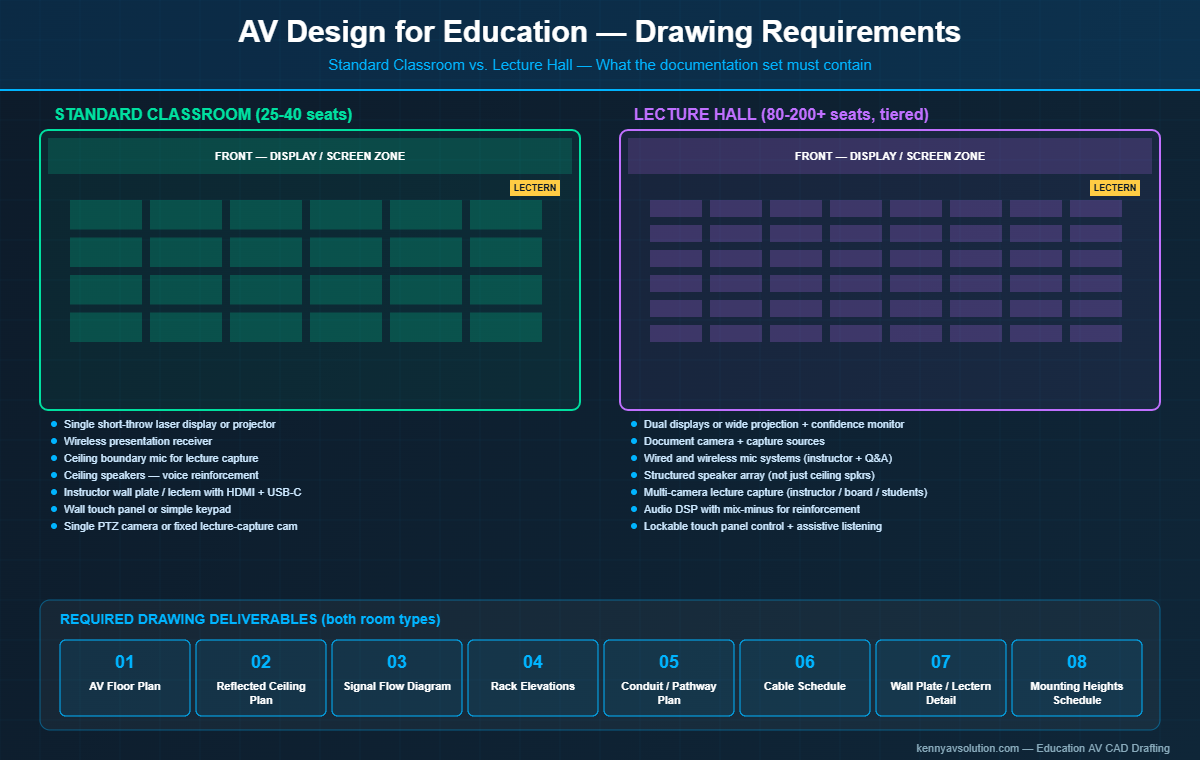
A typical classroom or lecture hall AV documentation set includes:
- Cover sheet with project name, room schedule, drawing index, revision history, and the AV designer’s stamp.
- Room-by-room AV floor plan showing device locations, mounting heights, and floor boxes.
- Reflected ceiling plan for every room with ceiling-mounted devices — projectors, microphone arrays, speakers, cameras, sensors.
- AV signal flow diagram per room type (if you have 40 identical classrooms, one diagram covers them all with a room schedule).
- Rack elevations for any equipment racks — instructor lectern, AV closet, IDF cabinet.
- Conduit and pathway plan coordinated with the EC drawings, showing what cable goes through which conduit and at what fill ratio.
- Cable schedule with every cable tagged, typed, lengthed, and tied to a source and destination.
- Detail sheets for instructor lecterns, wall plate layouts, projector mounting, screen brackets, microphone ceiling cutouts.
- Control system narrative or programmer’s spec describing user flow, button labels, page logic.
This is the minimum. Larger universities and school districts often require additional sheets for accessibility (ADA-compliant control heights, assistive listening coverage), security integration (door access tied to room scheduling), and ITS coordination (network drop labels, VLAN assignments).
Standard Classroom — What Goes on the Drawings
A “standard” classroom in modern education AV design is usually 25 to 40 seats with one or two projectors or short-throw laser displays, a wall-mounted instructor station or simple lectern, a wireless presentation system, a ceiling microphone or boundary mic for lecture capture, ceiling speakers for voice reinforcement, and a control system on a touch panel or simple wall keypad.
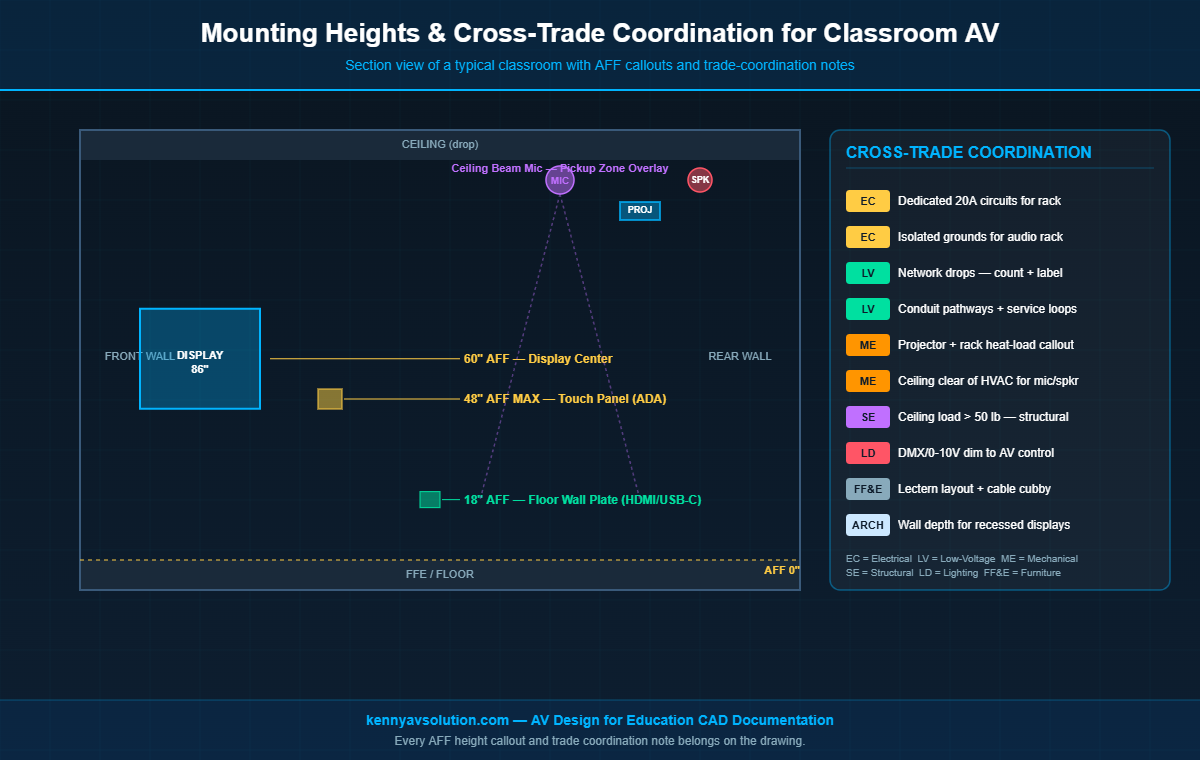
The drawings for this kind of room need to call out: instructor station location and orientation (where the teacher stands matters more than people think), projector or display center height (typically 60 inches AFF for screen center), screen size and aspect ratio with viewing distance verified against the 4/6/8 rule, ceiling mic pickup zone overlaid on the seating layout, speaker coverage pattern with intelligibility targets, and every wall plate location with exact AFF height and the connectors at that plate.
One detail education projects almost always need: an annotation on the drawing for the local code requirements for height of controls (typically 48 inches AFF maximum for ADA), and the camera shot the lecture capture system will produce — instructor framing or board framing or both.
Lecture Hall — Where the Drawing Complexity Lives
Once a room gets above 80 seats it stops being a classroom and starts being a lecture hall, and the drawing requirements scale fast. Lecture halls almost always have: dual displays or a single wide projection, a confidence monitor for the lecturer, sometimes a separate document camera display, a wired and wireless mic system, a structured speaker array (not just ceiling speakers), a multi-camera lecture capture rig, an audio DSP with mix-minus for the speaker reinforcement, and a control system that has to be lockable so unauthorized staff can’t change presets.
The signal flow diagram alone for a lecture hall can run two or three pages. The reflected ceiling plan gets dense with mic and speaker placements. The conduit plan often needs coordination with structural drawings because the speaker arrays and projectors have specific structural support requirements. Always coordinate with the structural engineer for any ceiling load over 50 pounds — get the load numbers onto the drawing for the GC.
The Mounting Height Schedule — Don’t Skip It
Every education AV drawing set should include a mounting heights schedule, ideally on the cover sheet or on the floor plan legend. This single table prevents 80% of the field RFIs you would otherwise get. Standard heights to include:
- Screen / display center: typically 60″ AFF for fixed screens, recalculated for tiered seating.
- Projector lens for ceiling-mounted: per manufacturer throw calculation, called out per room.
- Wall plate for instructor input: 18″ AFF or 42″ AFF depending on furniture.
- Touch panel or control surface: 42″ to 48″ AFF (ADA-compliant).
- Camera mounting: room-specific, but spec’d.
- Ceiling mic and speaker: at ceiling plenum (called out on the RCP).
- Assistive listening transmitter: 48″ AFF in a discreet location.
Every mounted device on every elevation should reference back to this schedule. When the GC asks “how high?” the answer is on the drawing.
Camera Sightlines and Lecture Capture Coverage
If the room has lecture capture, the drawings need to show camera positions, lens types, and the actual shots they’ll capture. Use a sightline overlay on the floor plan — a 90 or 120 degree cone from each camera showing what’s in frame. This is the single biggest source of post-install client complaints in higher ed: “the camera doesn’t show the whole board” or “the camera doesn’t see the back row of students.” Catching that on the drawing in design review saves a truck roll and a brackets swap after install.
For multi-camera setups (instructor, students, board), label each camera with its shot in the title block: CAM-01 INSTRUCTOR WIDE, CAM-02 BOARD CLOSEUP, CAM-03 STUDENT WIDE. The lecture capture appliance or the codec then references these tags in its preset programming.
Coordinating with the Other Trades
Education AV almost never lives alone. Your drawings have to coordinate with:
- Electrical: dedicated 20A circuits for racks, isolated grounds for audio, conduit pathways. Every AV outlet on the EC drawings should match a callout on your drawings.
- Low-voltage / structured cabling: network drops in every room — count, location, category, and label format. Your AV drawings tell the network installer where to leave a service loop.
- HVAC: projector and rack heat load called out for the mechanical engineer.
- Lighting: dimming or DMX integration with the AV control system for presentation modes.
- Furniture: instructor lectern layout coordinated with the FF&E spec.
The way to handle this on the drawing side is to put a coordination note on every sheet that has cross-trade dependencies — “Coordinate with EC drawing E-201 for power, LV-101 for network drops.” This makes you look professional and it covers you if a coordination item gets missed in the field.
Annotating for Long-Term Maintenance
One thing education clients value more than any other client type: maintainability. The building services team that inherits the room will reference your drawings for years. Make the drawings genuinely useful to them:
- Print equipment tags large enough to be read on an 11×17 plot.
- Include manufacturer part numbers and firmware version on the device schedule.
- Use plain English notes alongside the technical callouts.
- Provide as-built revisions within 90 days of substantial completion.
- Save a digital archive copy in the client’s preferred format (PDF, AutoCAD, Revit).
Need Education AV Drawings Drafted?
Kenny AV Solution drafts AV design for education projects — classrooms, lecture halls, learning studios, multi-purpose rooms, training centers — for AV integrators serving K-12, higher ed, and corporate education clients. We work in AutoCAD, Revit, Visio, D-Tools, and XTEN-AV, and we know the documentation standards that university procurement teams expect.
If you have a campus-wide classroom refresh, a new building, or even a single lecture hall on your desk, contact Kenny AV Solution for a quote and turnaround estimate. Our drafters have produced education AV documentation for dozens of school districts and university buildings, and we deliver packages your install crews and your client’s IT team will actually use.
Related reading: The Complete AV Design Documentation Package, AV Floor Plans vs Reflected Ceiling Plans, and Conference Room AV Wiring Diagrams.