
AV network security is the thing that stops modern AV projects, and it rarely stops them for technical reasons. The design is fine, the kit is ordered, the room is built — and then somebody in IT asks what all of this is, what it talks to, and who can log into it, and nobody has an answer written down. Weeks disappear. The lesson integrators keep relearning is that an AV system on a corporate network is an IT asset, and IT assets come with paperwork.
Security requirements are set by the client’s IT and security policy, not by AV, and regulated environments add obligations that their compliance team will define. AV’s job is to describe the system accurately, build to the policy, and say plainly where a device cannot meet it. Nothing below is a substitute for that policy.
AV is now something IT has to approve
Once video, audio and control moved onto Ethernet, AV stopped being a parallel universe of its own cabling and became a few hundred more endpoints on somebody else’s network. Codecs, encoders, decoders, DSPs, control processors, touch panels, cameras, displays and signage players are all networked computers, most of them running an embedded operating system that somebody has to take responsibility for.
The practical consequence is a gate in the programme that did not used to exist. Before the system goes live, a network or security team reviews it, and they will ask a fairly predictable set of questions. Answering them is largely a documentation exercise — which means it is work that can be done in advance, on the drawings, rather than improvised under pressure at commissioning.
Get the conversation started early, at the same point you would agree any other trade interface. The boundary between AV and IT is exactly the kind of scope edge covered in AV trade coordination, and on a networked system it is the most consequential one.
A VLAN is not a firewall
This is the misunderstanding worth correcting first, because “we put the AV on its own VLAN” is offered constantly as though it settled the question.
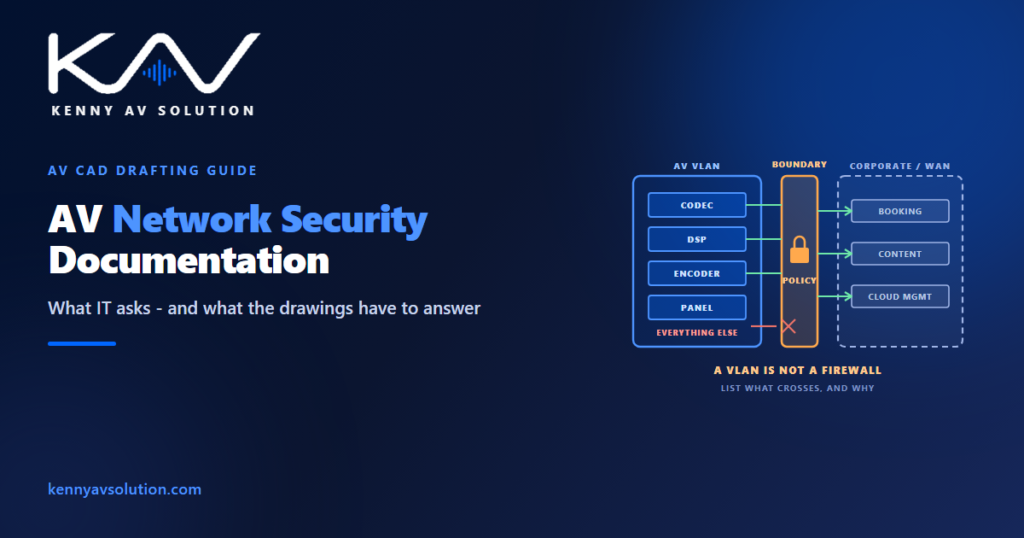
A VLAN is a layer 2 broadcast domain. It separates traffic, keeps AV multicast away from everything else, and is genuinely useful — the design reasons for it are covered in AV-over-IP network diagrams. What it does not do by itself is prevent anything from reaching anything else. The moment those VLANs are routed together, traffic passes between them unless something is explicitly configured to stop it.
Isolation comes from the policy applied at the routed boundary, not from the existence of the VLAN. So the useful question is not “which VLAN is it on” but “what is allowed across the boundary, in which direction, on which ports, and who decided that”. If the answer is nobody, the AV VLAN is a naming convention rather than a control.
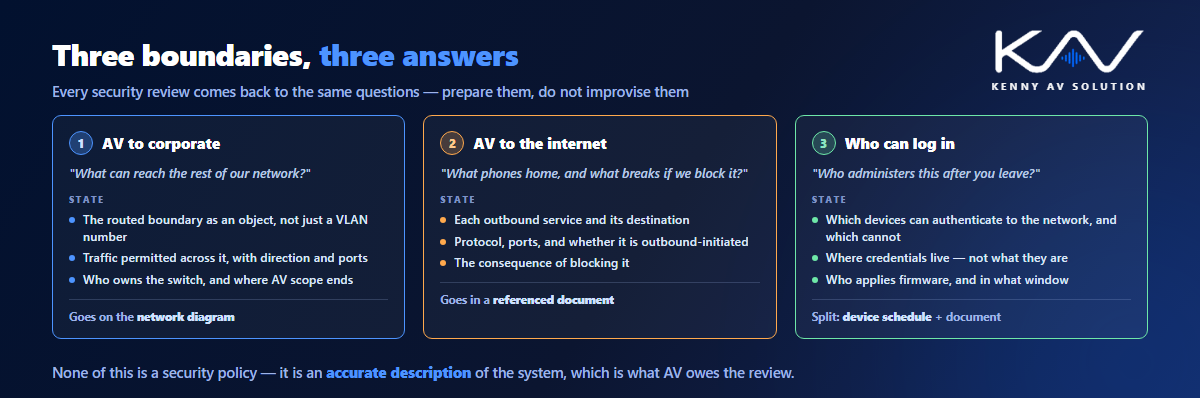
For documentation, that means showing the boundary as an object on the diagram, with the traffic that has to cross it listed. A control processor that has to reach a room booking system, a signage player that has to reach a content server, a codec that has to reach a conferencing service — each of those is a hole somebody has to agree to, and each should be a line in your documentation rather than a discovery.
Every device is an appliance with a password
The single most common finding when an AV system is assessed is credentials, and it is almost always the same three problems.
Defaults left in place. A great deal of AV equipment ships with a documented default administrative login, and that documentation is public. Changing them is trivial; doing it consistently across two hundred devices and recording it is not, which is why it gets skipped.
Nobody knows who holds the credentials. The integrator set them, the client assumes they have them, and the person who actually knows has left. Agree at handover where credentials live — a client-managed password vault is the usual answer — and record that arrangement rather than the passwords themselves.
Shared accounts with no accountability. Where the platform supports individual accounts or directory integration, use it. Where it does not, say so, because that is an exception the client has to accept knowingly.
Related and frequently missed: device web interfaces are often served over HTTP or with a self-signed certificate. Many organisations will want that addressed or formally accepted. It costs nothing to raise early and is awkward to raise during a security review.
The devices that cannot do what the network requires
Corporate networks increasingly require port-based authentication — 802.1X — before a device is allowed to communicate. A good deal of AV equipment has no supplicant and simply cannot authenticate.
The usual fallback is MAC-based authentication, where the switch admits a device because its hardware address is on a list. It works, and network teams accept it routinely, but it is weaker than 802.1X because a MAC address can be copied, and it commits somebody to maintaining that list for the life of the system. Either way it is a decision, and decisions belong on paper.
The drafting consequence is straightforward: your device schedule should say which devices can authenticate and which cannot, because that determines what the network team has to configure per port. On an estate of any size — the kind of density described in digital signage drawings or across a venue — that list is the difference between a switch configuration somebody can write and a fortnight of trial and error.
Remote access is the question that stalls projects
Nothing triggers more scrutiny than a device that reaches out to the internet, and modern AV does it constantly: cloud management platforms, licensing checks, conferencing services, content distribution, vendor remote support, firmware update servers.
Security teams want to know three things about each one — what connects out, where to, and why. Prepare that list rather than waiting to be asked. For each service, record the devices involved, the destination, the protocol and ports, whether the connection is outbound-initiated, and what breaks if it is blocked. That last column is the one that ends arguments, because it converts “the projector needs internet” into a consequence somebody can weigh.
Vendor remote support deserves particular care. A permanently open path into a client’s network for a third party is a significant decision, and it should be an explicit one with a defined mechanism, not a tunnel that quietly exists because it was convenient during commissioning.
The same applies to any recording or streaming capability. Where a system captures material that is sensitive — the recordings that are the official record in courtroom AV, or anything in a clinical setting as described in healthcare AV drawings — where that material goes and who can reach it is a question with obligations attached, and the client’s compliance team defines them.
Firmware, lifecycle and a mismatch nobody plans for
There is a structural problem in networked AV that is worth stating plainly to clients, because it is usually discovered late.
AV equipment is specified and installed to last. A display, a DSP or a matrix is expected to run for ten years or more, and the capital case assumes it. IT refreshes on a far shorter cycle and expects vendor support throughout. Somewhere in the middle, an AV device stops receiving firmware updates while remaining perfectly functional, and it becomes an unpatched endpoint on a managed network.
AV cannot solve that, but the documentation can make it visible. State who is responsible for firmware updates after handover, and how they will be applied — because on many systems an update requires a service window and a re-test, not a click. Where a manufacturer publishes a support lifetime, record it against the device, so the client can plan rather than find out.
All of which only works if the record survives, which is an argument for a properly maintained as-built set rather than a design set that was accurate on the day it was issued.
What goes on the drawings, and what goes in a document
Not all of this belongs on a drawing, and putting it there makes the drawing worse. The split that works:
On the network diagram: the segmentation boundary drawn as an object; VLANs and their purpose; which devices sit where; switch and port assignment; uplinks; and the demarcation between AV-provided and client-provided infrastructure.
On the device schedule: a column for whether the device authenticates, one for whether it requires outbound access, and the management address. Three columns that answer most of what a network team needs, kept with the tags used in the cable schedule so everything reconciles.
In an accompanying document: the outbound services table, the credential-handling arrangement, firmware responsibility, and any exception the client has accepted. These are lists that change and get reviewed, and they do not want to be trapped inside a CAD file — though the drawing should reference the document so nobody reads one without the other. Keep the naming consistent with your AV drawing standards as with any other deliverable.
In permanently staffed, always-on environments the scrutiny is heavier still, which is one of the constraints that makes control room documentation more demanding than ordinary commercial work.
Frequently asked questions
Is putting AV on its own VLAN enough to secure it? No. A VLAN is a layer 2 broadcast domain that separates traffic; it does not prevent communication between segments. Once VLANs are routed together, traffic passes unless a policy at that boundary stops it. Isolation comes from the rules applied at the routed boundary, so the documentation should state what is allowed to cross, in which direction and on which ports.
What does IT usually ask for before AV goes on the network? An accurate network diagram showing segmentation and the demarcation point, a device list with addressing and switch ports, which devices can authenticate to the network, what needs outbound internet access and why, how credentials are managed, and who is responsible for firmware after handover.
What if AV devices cannot support 802.1X? Many cannot. The usual fallback is MAC-based authentication, which network teams accept routinely but which is weaker and commits somebody to maintaining an address list for the life of the system. Record per device whether it can authenticate, so the port configuration can be written rather than discovered.
Who is responsible for AV firmware updates after handover? Whoever the contract says, which is why it needs stating. AV equipment often outlives its vendor firmware support, so record the update responsibility, the method, and any published support lifetime against each device, and expect updates to need a service window and a re-test rather than a click.
Should security information go on the AV drawings? Some of it. The segmentation boundary, VLANs, switch and port assignment and the demarcation belong on the network diagram, and authentication and outbound-access flags belong on the device schedule. Outbound service tables, credential arrangements and accepted exceptions belong in a referenced document, because they change more often than drawings do.
Need networked AV documented so IT will sign it off?
Kenny AV Solution produces AV drawing sets in AutoCAD for integrators, consultants and contractors worldwide — network diagrams with segmentation and demarcation drawn properly, device schedules with the columns a network team actually asks for, rack elevations with power and heat schedules, containment routing, cable schedules and as-builts, drawn to your standards and your title block. Send us the equipment list and the network intent and we will draw it so the review is a conversation rather than an excavation. See our AV CAD drafting services, grab the free AV CAD Drafting Standards Checklist, or schedule a quick call — we come back with a quote and timeline within one business day. For the underlying documentation standards, AVIXA is the reference worth having on the shelf.