
An AV cable schedule is the sheet your installers reach for most on site — and the one that causes the most rework when it is wrong. It tells the field team exactly what to pull, where each run starts and ends, and how it should be terminated. In this guide we break down how to read an AV cable schedule column by column, how it ties back to the rest of your drawing set, and the mistakes that quietly cost integrators days on site.
What is an AV cable schedule?
An AV cable schedule is a structured table that lists every single cable in an audiovisual system, with a unique ID for each run. Where a signal-flow diagram shows you what connects to what, the AV cable schedule tells you how to physically build it: cable type, length, connector at each end, and the exact device the run lands on. It is part of a coordinated AV shop drawing set, and it is normally the last sheet an installer checks before pulling any wire.
Done well, an AV cable schedule lets a crew pull, label, and terminate an entire room without calling the designer once. Done badly, it becomes a list of guesses.
How to read an AV cable schedule, column by column
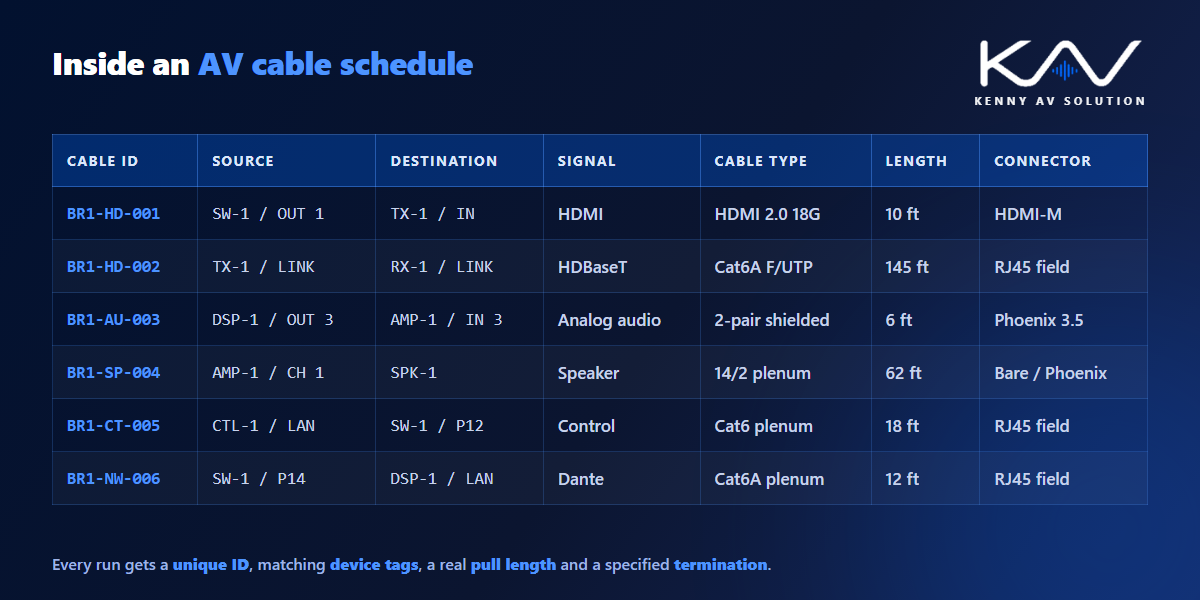
Most schedules follow the same core structure. Once you know what each column is for, any AV cable schedule becomes readable:
- Cable ID — the unique tag for the run (for example BR1-HD-004). This is what gets printed on the physical label at both ends.
- Source device & port — the equipment the cable originates from, tagged exactly as it appears on the diagrams and rack elevations. With attribute-driven blocks, those tags come straight from the drawing; see AV CAD blocks and attributes.
- Destination device & port — where the run terminates. The device ID here must match the same device everywhere else in the set. The device schedule is the master list those IDs come from.
- Signal type — HDMI, HDBaseT, Cat6A, Dante, speaker, control, or power — so the crew pulls the right product.
- Cable type / part number — the actual specified cable, not just a category, which avoids substitutions on site.
- Length — the estimated pull length including slack and service loop, used for ordering and for checking distance limits.
- Connector / termination — what goes on each end, and whether it is field-terminated or a factory lead.
- Room / zone and notes — location plus anything unusual: conduit runs, plenum rating, or a fire-rated pathway.
How the AV cable schedule ties into the rest of the set
An AV cable schedule is never a standalone document. Its value comes entirely from staying consistent with the other sheets:
- Signal-flow diagrams define the connections. Every line on a signal-flow drawing should appear as a row in the schedule — no orphans in either direction.
- Rack elevations confirm the source and destination ports physically exist where the schedule says. If a device sits in a different rack on the rack elevation, the run length is wrong too.
- Floor plans establish the route and therefore the realistic pull length. Straight-line distance on an AV floor plan is not the cable length — pathways, risers, and drops all add to it.
- Revision control keeps it current. If a device moves at Rev C, the schedule has to move with it — which is exactly why AV drawing revision control matters as much on this sheet as on any drawing.
When device IDs read identically across all four, the set is coordinated and the crew can work unsupervised.
Common AV cable schedule mistakes
The same handful of problems account for most cable-related site delays:
- Duplicate or reused cable IDs — two runs sharing a tag makes labelling and troubleshooting nearly impossible later.
- Straight-line lengths with no allowance for pathway, slack, or service loop, leading to short pulls and re-runs.
- Ignoring distance limits — an HDMI or HDBaseT run pushed past its rated distance without an extender specified.
- Mismatched device tags between the schedule and the diagrams, which breaks every cross-reference in the set.
- No plenum or fire-rating notes, discovered only when the inspector walks the job.
- Missing spare capacity — no allowance for future additions, so the next change order means new pathway work.
Most of these are drafting and quality-control issues rather than design issues. Producing the schedule in a disciplined AutoCAD workflow, cross-checked against the diagrams, prevents nearly all of them. Standards bodies such as AVIXA also publish guidance on how this documentation should be structured.
A quick AV cable schedule QC check
Before you issue any set, run a short quality-control pass over the schedule: every run has a unique ID, every device tag matches the diagrams, every length includes slack, and every signal type has a specified cable and connector. We turned our full drawing QC pass into a free one-page PDF — grab the AV CAD Drafting Standards Checklist and run it before your next submittal.
Need a coordinated AV cable schedule?
If building a clean AV cable schedule for every project is eating your team’s time, outsourcing the drafting is usually the fastest way to protect your schedule without adding headcount. At Kenny AV Solution we produce submittal-ready cable schedules and full AV drawing sets in AutoCAD, drawn to your standards, for integrators worldwide. See our cable schedule drafting service or schedule a quick call — we come back with a quote and timeline within one business day.