
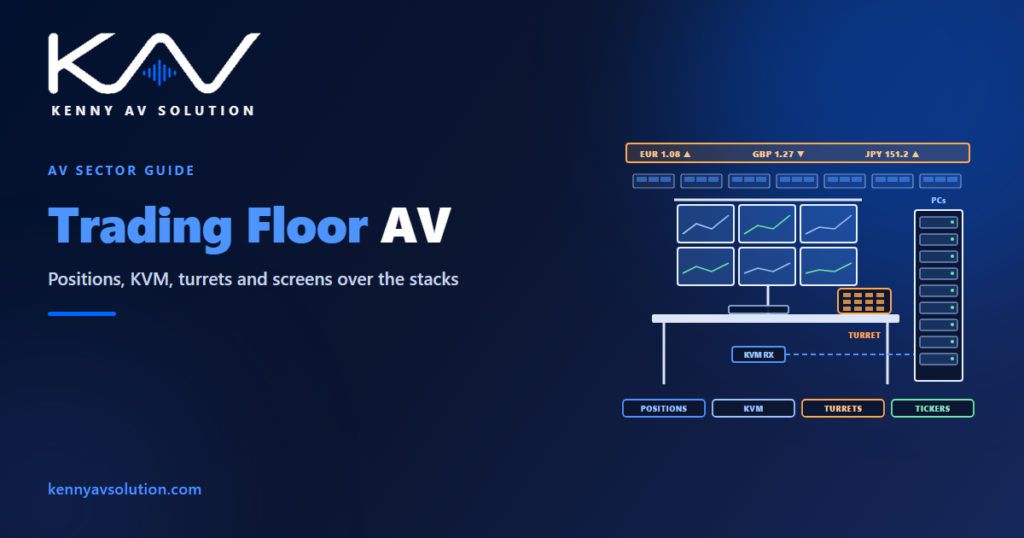
Trading floor AV drawings document a room where the same desk is repeated a hundred times and every one of them matters. Each trader sits behind a wall of four to eight monitors driven by computers that live somewhere else, talks to the market through a voice trading turret, watches news and prices on walls and tickers at the end of the row, and expects all of it to work at the opening bell. The floor is dense, the services under it are dense and the desks move between teams every year. The drawings are what make that density buildable and that churn manageable.
Voice recording and record-keeping for regulated trading are set by the firm’s compliance team and its regulators, and the turret system itself is designed by the specialist voice trading vendor. Power and cooling are sized by the electrical and mechanical engineers, and desk construction is the furniture manufacturer’s design. Product dimensions and port counts come from manufacturer data. What follows is common practice for the AV documentation.
The position is the unit of design
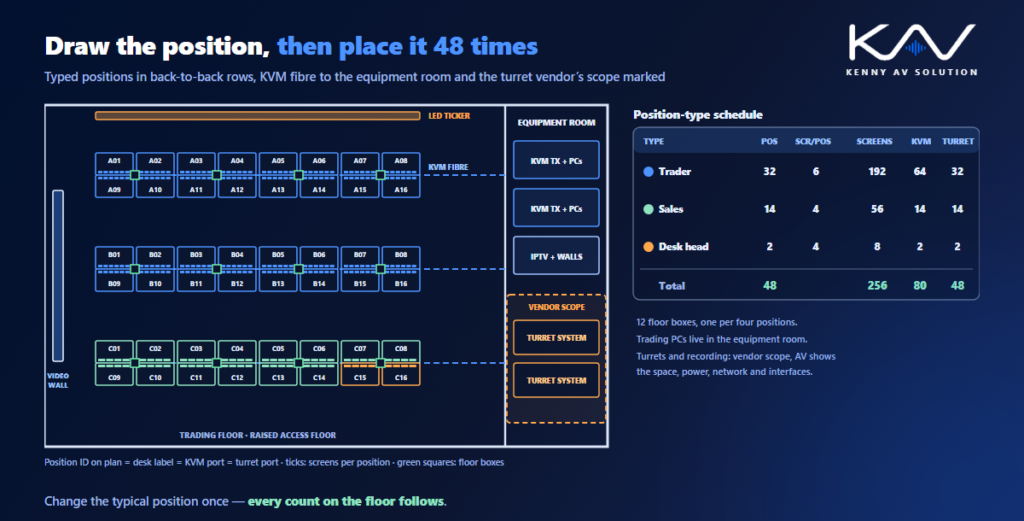
A trading floor is drawn from the position outwards. Agree the position types first: a trader with six screens and two computers, a salesperson with four screens and one computer, a desk head, a support seat. Draw one typical position for each type, plan and elevation, with the monitor arms or rail, screen sizes and mounting heights, the keyboard and mouse area, the turret handset and speaker, and what sits under the worktop. Then the floor plan places positions rather than devices, and a position-type schedule carries the counts. This is the same discipline as the device schedule, applied one level up: change the typical position once and every count on the floor follows.
KVM: the computers leave the floor
Most modern floors move the trading computers off the desk into a central equipment room and send keyboard, video and mouse to each position over fibre or the network. The floor gets quieter and cooler, and a failed computer is swapped without disturbing the trader. On the drawings that means a KVM receiver at every position, a link back to the equipment room for every computer the position uses, and the matching transmitters in the racks. Show the receiver location under the desk, the number of links per position type and where the fibre runs, and carry the heat that has left the floor into the rack power and heat load of the equipment room. The KVM approach in control room AV drawings is the closest relative.
Turrets belong to a specialist, the interface belongs on your set
The trading turret, the dealer board that carries private lines to counterparties, intercom between desks and the hoot-n-holler broadcast across the floor, is usually designed, supplied and maintained by a specialist voice trading vendor, along with its recording. Do not draw their system for them. Do draw everything they need from everyone else: the turret’s space on the desk, its power and network at each position, the speaker boxes, the vendor’s racks in the equipment room and the points where turret audio meets AV, such as a desk head’s microphone feeding a floor-wide announcement. A responsibility matrix that names the vendor’s scope stops the gap from becoming a dispute.
Under the floor and inside the desk
A trading floor usually sits on a raised access floor, and the AV, network, turret and power services rise into each cluster of desks through floor boxes into a cable spine inside the furniture. The desks are made by a furniture manufacturer to their own shop drawings, so the AV drawings must give them the routes, the cut-outs and the equipment that has to fit under the worktop, early enough to change the design. Show floor box positions against the desk layout, the contents of each box and the spine route, and coordinate them with the data cabling in structured cabling drawings. Power per position is driven by the screen count, so state it per position type and let the electrical engineer size the circuits.
Walls, tickers and television
News channels, market data and the floor’s own dashboards go on displays above the end of each row and on LED tickers along the walls. Because traders sit behind tall monitor stacks, the bottom of anything meant to be seen across the floor has to clear the top of those stacks from the farthest seat, so draw the sightline section before fixing a mounting height. Detail large walls as in LED video wall drawings, and show where the television channels come from: news feeds usually reach both the walls and individual desktops, which is a job for IPTV distribution. A floor-wide announcement system, overriding the background audio and muting on fire alarm, completes the picture.
Position IDs survive the churn
Trading floors are rebuilt in small pieces constantly: a team grows, a desk moves, a position changes type. What makes that cheap is one ID per position used everywhere, on the floor plan, the desk label, the KVM port, the turret port, the network patch and the floor box schedule. Put the ID scheme on the drawings from the first issue, follow the method in AV cable labelling, and keep the set current after handover as as-built drawings, so the next move starts from what is actually installed.
Frequently asked questions
What do trading floor AV drawings include? A typical position drawing for each position type, a floor plan placing positions, KVM and signal flow to the equipment room, floor box and desk spine details, video wall and ticker elevations with sightline sections, rack elevations and a position-type schedule with screen, KVM and turret counts.
Why are trading computers kept off the desk? Moving them to a central equipment room and connecting each position through KVM extenders makes the floor quieter and cooler, keeps the hardware secure and lets support staff replace a failed computer without disturbing the trader.
Who designs the trading turret system? Usually a specialist voice trading vendor designs, supplies and maintains the turrets, dealer boards and their recording. The AV drawings show the space, power, network and interfaces the turrets need, and the responsibility matrix names the vendor’s scope.
How high should displays be mounted on a trading floor? High enough that the bottom of the display clears the top of the monitor stacks from the farthest seat that needs to see it. Draw a sightline section for each wall or ticker before fixing the height.
How do you keep trading floor drawings useful after handover? Give every position a single ID used on the plan, the desk label, the KVM and turret ports, the network patch and the floor box schedule, and update the drawings as as-builts every time desks move.
Need trading floor AV drawings?
Kenny AV Solution drafts AV documentation for integrators, consultants and design-build teams worldwide — typical position plans and elevations, floor layouts, KVM signal flow, floor box and desk spine details, video wall and ticker elevations, rack elevations and position schedules for trading floors and dealing rooms, all drawn to your standards and your title block. See our drafting services, get an existing set checked with a drawing set review, or schedule a quick call — we come back with a quote and timeline within one business day.