
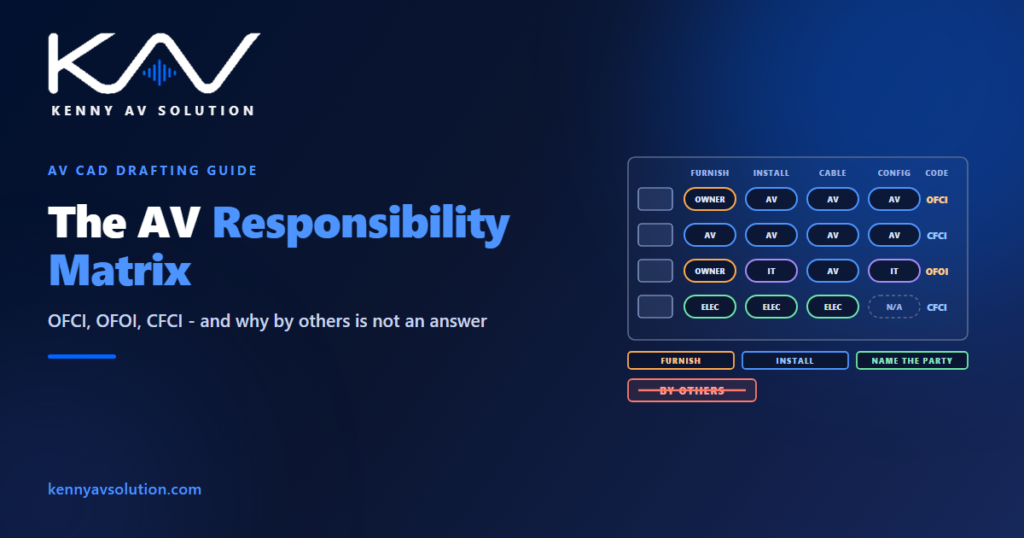
The most expensive two words on an AV drawing are “by others”. They tell the installer that something is not their job without saying whose job it is. An AV responsibility matrix replaces them with a named party for every item — who buys it, who installs it, who cables it, who makes it work — and the abbreviations OFCI, OFOI and CFCI are the shorthand most projects use to write that down.
What OFCI, OFOI and CFCI mean
The codes combine two questions: who furnishes the item (buys and delivers it) and who installs it.
- CFCI — contractor furnished, contractor installed. The normal case for most AV equipment: the integrator supplies and installs it.
- OFCI — owner furnished, contractor installed. The owner buys it, often through their own purchasing agreement, and the contractor installs it. Displays and computers are common examples.
- OFOI — owner furnished, owner installed. The owner’s own team or vendor supplies and installs it; the drawings show it only so everyone else can coordinate around it. Network switches run by the owner’s IT department are a typical case.
- CFOI — contractor furnished, owner installed. Less common: the contractor supplies the item and the owner installs it later.
Projects also use NIC, not in contract, for items shown for reference only. One word in the codes needs care: “contractor”. On a project with several trades, it has to be clear which contractor — the AV integrator, the electrician or the general contractor. The codes are a starting point, not the whole answer.
Why “by others” is not an answer
Scope gaps rarely happen in the middle of a trade’s work. They happen at the edges, where one party’s item meets another party’s.
- An owner-furnished display on a contractor-furnished mount, where nobody confirmed the mount fits the display that was actually bought.
- An owner-run network switch that the AV system depends on, where nobody agreed who sets up the VLANs and ports the AV devices need.
- Owner-supplied furniture that needs an AV table box, where the cutout, the box and the insert belong to three different parties; see AV wall plate and connector details.
- The power outlet behind a display, which the electrician provides but the AV drawings have to locate.
Every one of those is resolved by naming a party in writing, and every one becomes a change order when the drawing says “by others”. The broader coordination picture is in AV trade coordination.
Furnish and install are not the only verbs
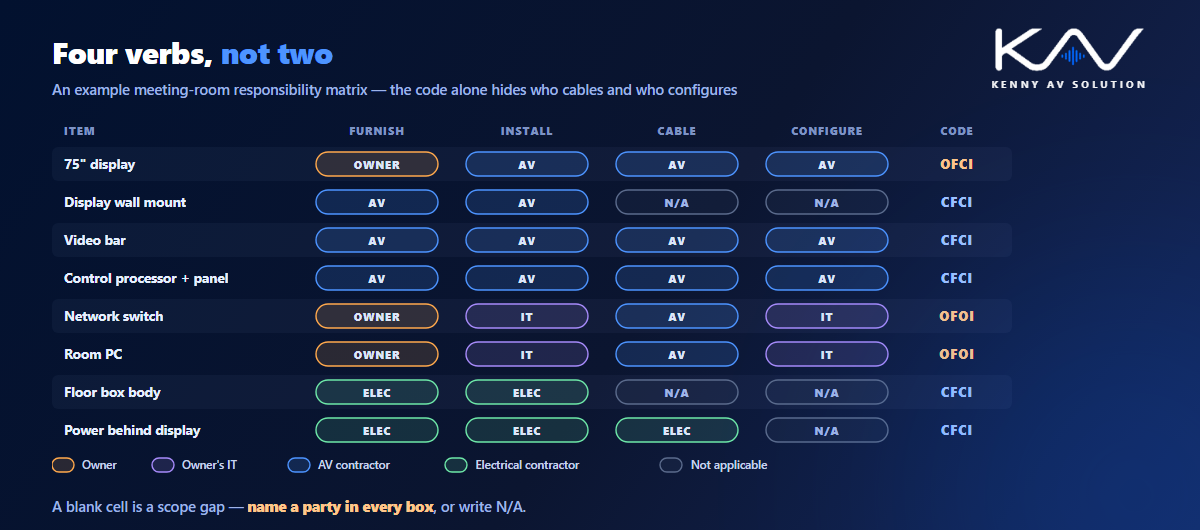
OFCI and CFCI answer two questions. AV equipment usually raises at least four.
A display can be owner furnished and contractor installed, and still leave open who runs the cable to it, who terminates that cable, who configures the display’s network settings, and who tests it. A network switch can be owner furnished and owner installed, and still need the AV contractor to patch the AV devices into it. So a useful matrix has more columns than the code suggests: furnish, install, cable, configure at minimum, and often program and test as well, which ties straight into commissioning and performance verification.
The rule for the matrix is simple: every cell names a party or says “not applicable”. A blank cell is a scope gap waiting to be found on site.
Put the code where the installer looks
A responsibility matrix that lives only in the specification is read once, at bid time. The installer reads the drawings. For what belongs in each document, see AV drawings vs specifications.
Carry the responsibility on the drawings themselves: as a column in the equipment or device schedule, as a suffix or note on the device tag where it matters, and as a legend entry explaining the codes. Owner-furnished items deserve a distinct symbol treatment or hatch on the plans so they stand out. Keep the codes and their meaning consistent across projects in your AV drawing standards, and make sure the drawings agree with the specification — often the AV section within Division 27 of the project manual, organised under CSI MasterFormat — because a conflict between the two is its own dispute.
Cables to owner-furnished equipment still need IDs on the cable schedule, with the termination responsibility at each end stated, especially where one end lands on owner equipment.
Owner-furnished equipment still has dimensions and dates
OFCI items are the ones most likely to cause trouble, because the design depends on equipment the AV contractor does not control.
The drawings need the owner’s model, or at least its size, weight and power, early enough to set the blocking, the backboxes and the mounts; see AV wall elevations and mounting details and rack power and heat load. Where the model is not yet chosen, design for a stated range and mark the item to be confirmed rather than guessing.
Owner-furnished equipment also needs a delivery date that suits the installation programme, a decision on who receives, inspects and stores it on site, and clarity about warranty — an item the owner bought carries the owner’s warranty, not the integrator’s. None of that is drafting, but the drawings are where the questions first become visible.
The matrix changes, so revise it like a drawing
Responsibilities move during a project. Value engineering shifts displays to the owner’s purchasing agreement; the owner’s IT team takes over the network; a furniture package changes hands. Each change moves cost and risk between parties.
Treat the matrix as a controlled document: revise it, cloud the changes and issue it with the drawings, following the same discipline as AV drawing revision control. On a consultant-led project the matrix is part of the bid documents; on a design-build project the integrator usually writes it — the difference is covered in design-build vs bid-spec.
What a good AV responsibility matrix contains
- Every device or system on the project, keyed to the device tags on the drawings.
- Columns for furnish, install, cable and configure, plus program and test where relevant.
- A named party in every cell — owner, AV contractor, electrical contractor, owner’s IT — or “not applicable”.
- The resulting code (CFCI, OFCI, OFOI) for quick reading.
- Owner-furnished details: model or design range, size, weight, power and delivery date.
- A legend on the drawings explaining the codes and symbols.
- A revision history, issued with the drawings.
Frequently asked questions
What does OFCI mean? Owner furnished, contractor installed. The owner buys the item and the contractor installs it. In AV, displays and computers bought through the owner’s own purchasing agreement are common OFCI items.
What is the difference between OFOI and CFCI? OFOI means owner furnished, owner installed: the owner’s team or vendor supplies and installs the item, and the drawings show it only for coordination. CFCI means contractor furnished, contractor installed: the contractor supplies and installs it, which is the normal case for most AV equipment.
What is an AV responsibility matrix? A table listing every device or system with the party responsible for each task — at least furnishing, installing, cabling and configuring — so that no part of the scope is left unassigned. It is usually issued with the drawings and the specification.
Why should drawings avoid “by others”? Because it says a task is not the reader’s without saying whose it is. Scope gaps happen at interfaces between parties, and naming the responsible party in writing is what prevents them from becoming change orders on site.
Where should responsibility codes appear on AV drawings? In the equipment or device schedule as a column, on device tags or notes where it matters, and in the drawing legend, with owner-furnished items visibly distinguished on the plans. The drawings and the specification must agree.
Need a responsibility matrix built into your AV drawings?
Kenny AV Solution produces AV drawing sets in AutoCAD for integrators and consultants worldwide — device schedules with responsibility codes, floor plans and RCPs with owner-furnished items distinguished, signal flow, rack elevations and cable schedules, drawn to your standards and your title block. Send us your equipment list and scope split, and we will produce a set where every item has an owner. See our AV CAD drafting services, grab the free AV CAD Drafting Standards Checklist, or schedule a quick call — we come back with a quote and timeline within one business day.