
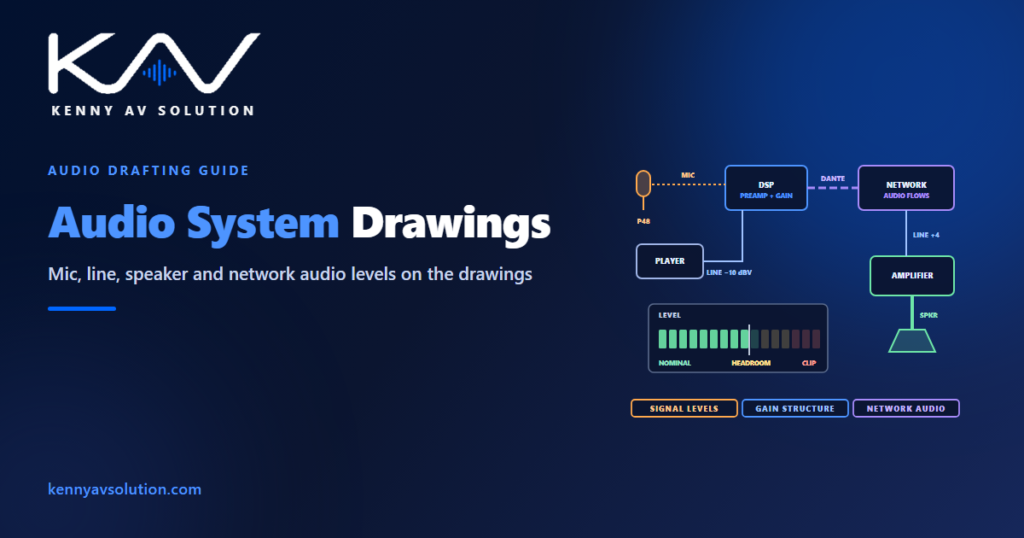
Audio system drawings often treat every audio connection the same way: a line labelled “audio” from one box to another. But a microphone, a media player, an amplifier output and a network audio stream carry signals that differ by a factor of thousands in voltage, need different cables and connectors, and fail in different ways when they are connected wrongly. The drawing should say which is which. When it does, the installer wires the right inputs, the commissioning engineer knows what to expect, and the system is quiet and clean from the first day.
Levels, sensitivities and input ratings vary by product, and the manufacturer’s data governs. The figures below are typical values used for illustration.
Four kinds of audio signal
- Microphone level — very small signals straight from a microphone, often tens of decibels below line level, which need a preamplifier before anything else. Condenser microphones also need phantom power, usually 48 V, sent up the microphone cable.
- Line level — the working level between most devices. Professional equipment is usually designed around +4 dBu (about 1.23 V) on balanced connections; consumer equipment around −10 dBV (about 0.32 V), often unbalanced.
- Loudspeaker level — the high-power output of an amplifier, either low-impedance direct to loudspeakers or on a 70 V or 100 V line, as in paging system drawings.
- Network audio — digital audio carried over the network, such as Dante or AES67-compatible systems, with no analogue level at all until it is converted back.
Show the level on every audio line
On the signal flow diagram, give each kind of signal its own line type or label: MIC, LINE, SPKR and the network audio protocol. Mark which microphone inputs need phantom power. Mark balanced and unbalanced connections. It costs a few annotations and settles questions that otherwise get answered on site with a meter — or not at all.
Carry the same information into the cable schedule, where the cable type follows from the signal: shielded twisted pair for microphone and line level, heavier loudspeaker cable sized for the run, and network cable for network audio. Keep microphone cables away from loudspeaker and power cables in containment, and say so in the notes.
Where levels do not match
Consumer and professional line levels differ by about 12 dB. A media player or a laptop at −10 dBV feeding a +4 dBu input arrives too quiet, and someone turns it up further down the chain, raising the noise with it. Going the other way, a professional output can overload a consumer input. Where the drawing connects the two, show how the level is matched — an input set for consumer level, a matching interface, or a note to set the gain at the input — and use an isolating interface where an unbalanced device connects over a long run, as described in AV grounding and bonding.
Gain structure: set the level early
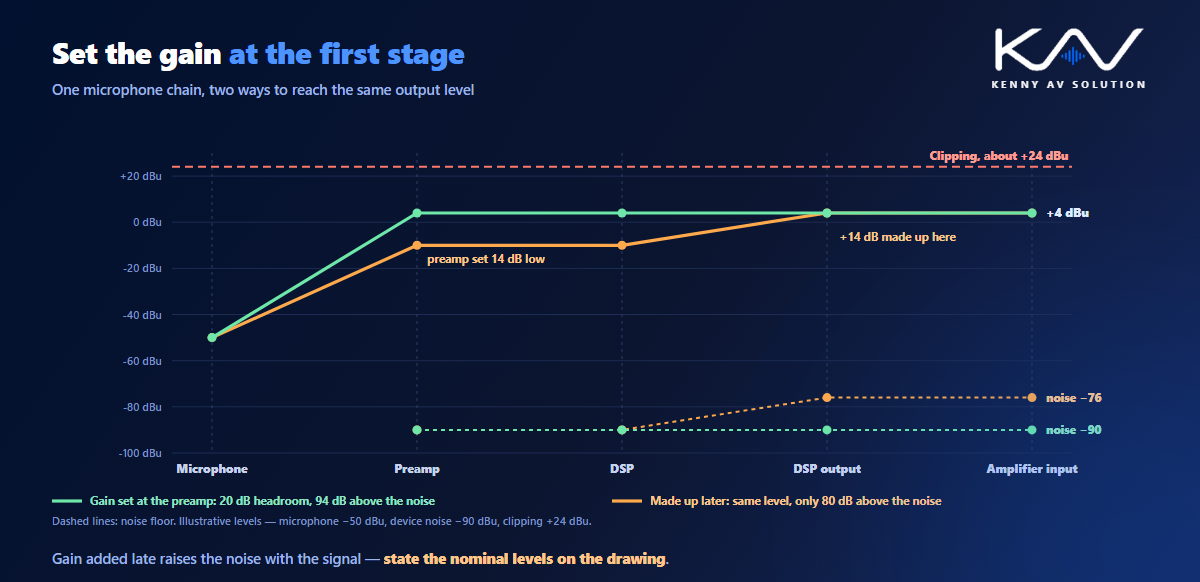
Gain structure is how the signal level is set as it passes through each device. Every device adds a little noise, and every device has a maximum level above which it clips and distorts. The aim is to bring the signal up to its working level at the first gain stage — usually the microphone preamplifier — and keep it there, with enough headroom below clipping for peaks.
If the first stage is set too low and the level is made up later, the later gain amplifies the noise along with the signal. In the illustrative chain below, setting the preamplifier 14 dB low and adding the 14 dB back at the output leaves the same final level — but with the noise 14 dB higher. The drawing cannot set gains, but it can state the nominal level at each point and the target headroom, which gives the commissioning engineer something to verify; see commissioning.
Network audio on the drawings
Network audio changes what the drawings must show. Instead of individual cables for each channel, the signal flow shows flows between devices — which device sends which channels to which receiver. The network itself becomes part of the audio system: switches, VLANs, quality-of-service settings and, where used, separate primary and secondary networks for redundancy. Follow the manufacturer’s network guidance, and show the audio network on the AV network diagram.
Clocking matters too: one device is the master clock for the network audio, and every converter follows it. State which, so it is not left to chance.
What the audio drawings should show
- Signal flow with MIC, LINE, SPKR and network audio distinguished by line type or label.
- Phantom power marked at every microphone input that needs it.
- Balanced and unbalanced connections identified, with level matching shown where consumer and professional equipment meet.
- Nominal levels and target headroom at key points in the chain.
- Network audio flows, the clock master, and the audio network on the network diagram.
- Cable types that follow from the signal, with separation from loudspeaker and power cables noted.
- Loudspeaker lines with impedance or line voltage, as in loudspeaker coverage drawings.
Frequently asked questions
What is the difference between mic level and line level? Mic level is the very small signal straight from a microphone, often tens of decibels below line level, which needs a preamplifier. Line level is the working level between most devices: around +4 dBu for professional equipment and −10 dBV for consumer equipment.
What is the difference between +4 dBu and −10 dBV? They are the nominal line levels of professional and consumer audio equipment. +4 dBu is about 1.23 V and −10 dBV about 0.32 V, a difference of about 12 dB, so connecting one to the other needs the level to be matched.
What is gain structure in an audio system? The way signal levels are set through each device in the chain. Good gain structure brings the signal to its working level at the first gain stage and keeps it there, well above the noise and with enough headroom below the point where equipment clips.
What is phantom power? A DC voltage, usually 48 V, sent from a mixer or audio processor up the microphone cable to power condenser microphones. The drawings should mark which microphone inputs need it.
How is network audio such as Dante shown on AV drawings? As flows of channels between devices on the signal flow diagram, rather than individual cables, with the audio network, its switches, VLANs and any redundant network shown on the network diagram, and the clock master identified.
Need audio system drawings?
Kenny AV Solution drafts AV documentation for integrators and consultants worldwide — audio signal flow with levels and phantom power marked, network audio flows, cable schedules and loudspeaker layouts, drawn to your standards and your title block. Send us the equipment list and the audio design. See our drafting services, grab the free AV CAD Drafting Standards Checklist, or schedule a quick call — we come back with a quote and timeline within one business day.