
Esports arena AV drawings document a venue where the game itself is the content. Ten players sit on a stage, a crowd watches the match on a giant screen above them, casters call the action, and a production team turns the whole thing into a broadcast for an audience many times larger than the one in the room. The players must not see or hear what the crowd sees, every frame on the big screen comes from a computer, and a few milliseconds of network delay can decide a match. The drawings are what keep the stage, the production and the network working together.
Competition rules, player equipment and anti-cheat requirements are set by the tournament organiser and the game publisher, the competition network by the network engineer and the venue’s internet provider, rigging loads by the structural engineer, lighting design and power by the lighting designer and electrical engineer, and broadcast requirements by the production company. Product dimensions and port counts come from manufacturer data. What follows is common practice for the AV documentation.
Start from the stage
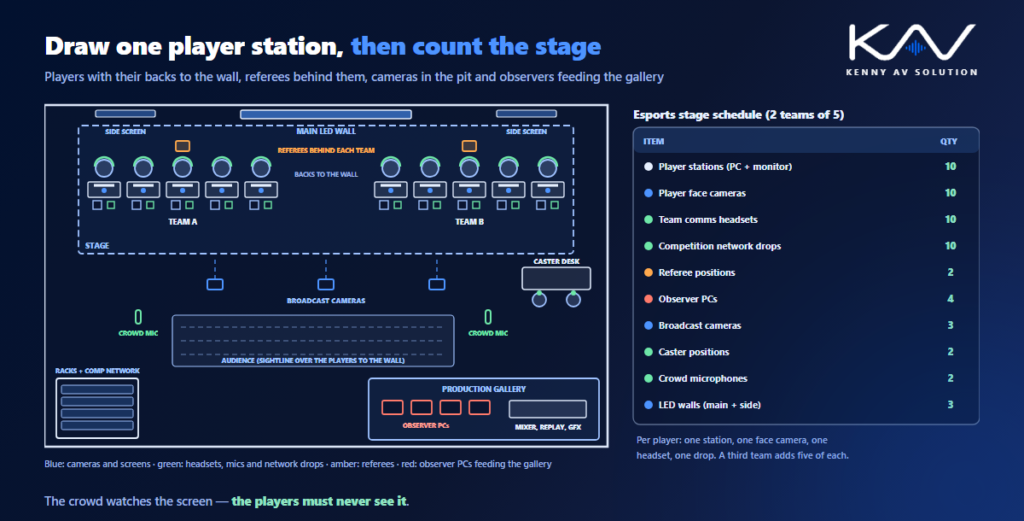
An esports stage is laid out around the match: two team areas facing each other or angled towards the audience, a main LED wall above or between them showing the game, side screens with player cameras and statistics, a caster desk, a host position and the referees. Draw the stage plan first and check two things in section. The audience has to see the main screen over the players’ heads, and the broadcast cameras need a clear shot of the players’ faces without the screen behind them burning out the picture. The conventions for the screen itself, from the cabinet grid to the processors, are in LED video wall drawings, and seating sightlines in the bowl follow the same logic as stadium and arena AV drawings.
The player station is the unit of design
Each player needs the same kit: a competition PC, a high-refresh monitor at the desk, keyboard and mouse connections, a closed-back headset on the team comms, a face camera for the broadcast and a wired network drop. Draw one typical player station in detail, with the desk, the monitor arm, cable management, the camera mount and where the PC sits (on the desk, under it or in a rack behind the stage), then count stations on the plan rather than drawing every cable twice. A schedule per station type makes a sixth player or a third team a matter of changing one number, and it gives the electrical engineer a load per station instead of a guess per stage.
Comms, isolation and the referee
Players talk to each other on a team channel, the referee can talk to every team, and the broadcast often records team comms for replays. That is an intercom system, and it belongs on the signal flow with every headset, belt pack and channel shown. Isolation matters just as much: players must not hear the casters, the crowd or the arena sound, so headsets carry masking noise and the loudest parts of the PA are aimed away from the stage. Some venues put teams in glazed booths, which need ventilation, power and a cable route of their own. Show the referee positions with a view of every player screen, and plan the radio microphones for hosts and interviews using the coordination in wireless microphone system drawings.
Observers and the production gallery
The game picture does not come from the players’ screens. Observers run spectator copies of the game on their own PCs and choose what the audience sees, so observer positions are a production role that needs desks, PCs and outputs like any camera. Their feeds go to the production gallery with the camera feeds, replay, graphics and the casters’ audio, and the programme output goes to the stream, the main LED wall and the side screens. Draw this as a signal flow from every source to every destination, state the resolution and frame rate of each feed, and follow the gallery layout in broadcast studio AV drawings when the gallery is a permanent room.
Casters, the crowd and the lighting
The caster desk is a small studio inside the arena: two or three commentators with headset microphones, monitors showing the programme and the observers’ feeds, talkback from the producer, and cameras framed on them for the stream. Place it where casters can see the stage and the main screen, but where their voices will not reach the players. Crowd microphones capture the reaction for the broadcast, and the PA has to be loud enough for the audience without washing over the stage. Lighting has two jobs at once: show lighting for the crowd and even, flicker-free light on players and casters for the cameras, all coordinated on the lighting plan with the conventions in lighting CAD drawings.
Network, power and the cable routes
The competition network is not the venue Wi-Fi. Players’ PCs sit on an isolated, wired network with its own switches, and the stream needs a dedicated, ideally redundant, internet uplink. Show the network as its own diagram with separate VLANs for competition, production and public use, as in AV over IP network diagrams. Power each team area from dedicated circuits, with the load per station from the schedule and UPS for the competition PCs, and total the racks using rack power and heat load calculations. Then draw the cable routes between the stage, the production gallery and the racks, with floor boxes, stage risers and containment sized for the event that adds a third camera at the last minute.
Frequently asked questions
What do esports arena AV drawings include? A stage plan with team areas, the main LED wall and caster desk, a typical player station detail, a sightline section, signal flow from observers and cameras to the production gallery, an intercom diagram for team comms, a competition network diagram, power per station and rack elevations.
Why do esports players wear headsets with masking noise? To stop them hearing the casters, the crowd and the arena sound, which could give away information about the game. The headset carries team comms and the referee, while masking noise covers everything else.
What is an observer in esports production? An operator who runs a spectator copy of the game on a separate PC and chooses the views the audience sees. Observer feeds go to the production gallery like camera feeds and become the picture on the stream and the main screen.
Does an esports venue need a separate network? Yes. The competition PCs should sit on an isolated, wired network with its own switches, separate from production and public Wi-Fi, and the stream needs a dedicated internet uplink, ideally with a backup.
How is the stage lit for esports broadcasts? With even, flicker-free light on the players and casters so the cameras see faces clearly, while show lighting works on the crowd and the stage. Both are coordinated on the lighting plan so neither spoils the other.
Need esports arena AV drawings?
Kenny AV Solution drafts AV documentation for integrators, consultants and design-build teams worldwide — stage plans and sightline sections, player station details, LED wall layouts, production signal flow, intercom and network diagrams, power schedules and rack elevations for esports arenas, gaming venues and event spaces, all drawn to your standards and your title block. See our drafting services, get an existing set checked with a drawing set review, or schedule a quick call — we come back with a quote and timeline within one business day.