
If you’ve ever stared at an AV drawing and wondered what a particular symbol means, you’re not alone. The AV industry spans a huge range of technologies — from simple microphone inputs to complex signal processing chains — and without a shared visual language, drawings quickly become confusing and error-prone.
That’s where the AVIXA AV drawing symbols standard comes in. Created by AVIXA (the Audiovisual and Integrated Experience Association), this standard gives designers, integrators, and engineers a common set of symbols to use across floor plans, signal flow diagrams, rack elevations, and other AV documentation.
In this quick reference guide, we’ll break down what the standard covers, the most common symbol categories, and how to apply them in your everyday AV design work.
What Is the AVIXA AV Drawing Symbols Standard?
AVIXA is the global trade association for the professional AV industry, and it publishes a range of technical standards under its ANSI/AVIXA umbrella. Their drawing symbols standard — formally known as ANSI/AVIXA 2M-2010 (Standard for Audiovisual Systems Design and Coordination Processes) — defines a set of standardized graphic symbols specifically for use in AV system documentation.
Think of it like the NEC or ASHRAE standards in their respective industries: it’s not always a legal requirement, but it’s the professional benchmark that serious AV firms follow. Using the AVIXA standard tells your clients and project partners that your drawings are accurate, consistent, and easy to interpret by anyone with AV knowledge.
The standard covers symbols used in:
- Audio signal flow diagrams
- Video and data system diagrams
- Control system drawings
- Network and IT infrastructure diagrams
- Floor plans and reflected ceiling plans (RCPs)
Why Standardized AV Symbols Matter
Non-standard AV drawings cause real problems on installation day. When a rack builder sees a symbol they don’t recognize, they either guess or stop and call — and both cost time and money. Electricians, low-voltage contractors, and general contractors working alongside AV teams need to read the same drawing without a decoder ring.
Standardized symbols also matter for:
Multi-Firm Collaboration
On large commercial projects, the AV design might be created by one firm and installed by another. When both parties use AVIXA-standard symbols, handoffs are clean and assumptions are minimized.
Long-Term Maintenance
A building might have its AV system serviced by multiple vendors over 10-20 years. Standard symbols mean whoever picks up the drawings — even a decade later — can still understand the system.
Client Communication
End clients reviewing design drawings don’t need to know every symbol in detail, but consistent, professional documentation builds confidence. It shows you’re operating at a professional level.
Common AVIXA AV Symbol Categories
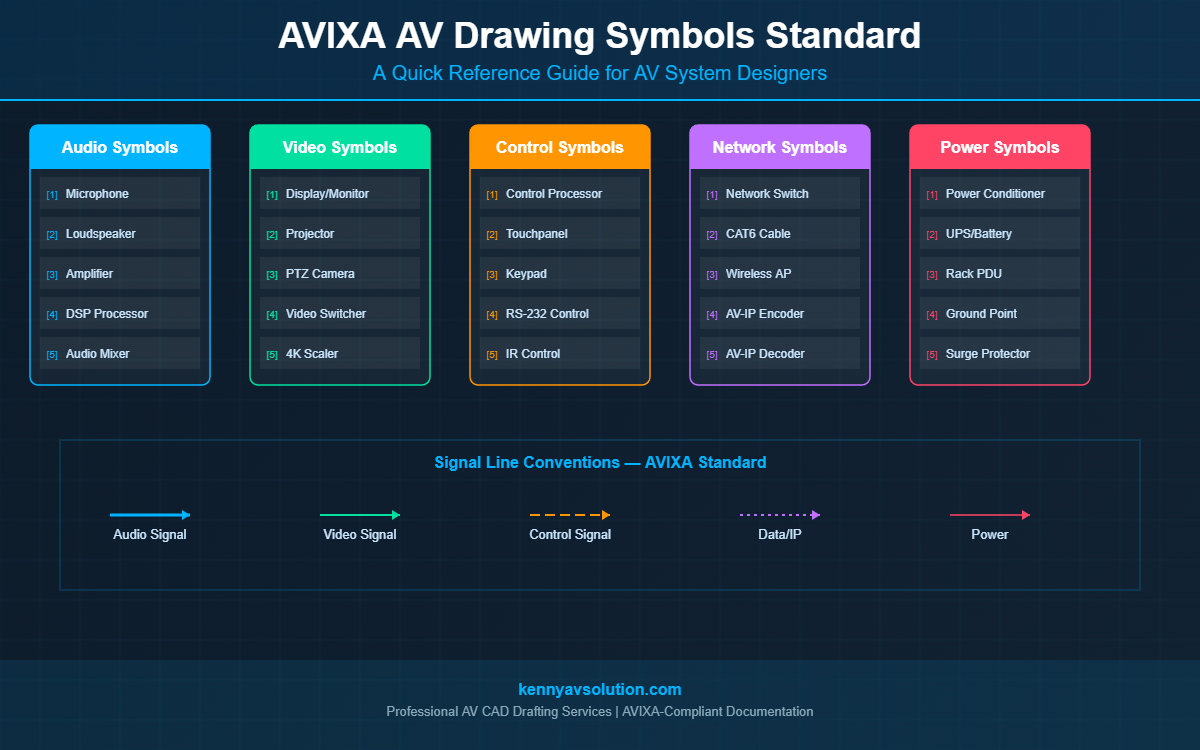
The AVIXA standard organizes symbols into logical categories based on the type of equipment or function. Here’s a quick overview of the main groups:
1. Audio Symbols
Audio symbols cover microphones, speakers, amplifiers, mixers, DSPs, and audio signal paths. Common ones include:
- Microphone: Typically shown as a small oval or capsule shape on a stand icon
- Speaker / Loudspeaker: A cone shape, sometimes with directional arrows for ceiling or pendant mounts
- Amplifier: A triangle pointing in the direction of signal flow
- DSP / Audio Processor: A rectangle with the abbreviation (e.g., “DSP”) and connection ports
- Audio Input/Output: XLR and RCA connector symbols differentiated by shape
2. Video Symbols
Video symbols represent displays, cameras, video sources, scalers, and matrix switchers. Key examples:
- Display / Monitor: A rectangle with a screen aspect ratio (often 16:9) and a stand or mount indicator
- Projector: A trapezoidal beam shape, often with a lens circle
- Camera: A box with a lens barrel, sometimes with a directional indicator
- Video Matrix / Switcher: Shown as a grid-style symbol or labeled box with numbered I/O ports
- Video Signal Path: Bold lines, often with arrowheads showing signal direction
3. Control System Symbols
Control drawings show how user interfaces tie back to processors and devices. Common control symbols include:
- Control Processor: Rectangle labeled with the processor type or brand abbreviation
- Touchpanel / Keypad: A small rectangle with a screen or button grid icon
- Relay / Contact Closure: A standard electrical relay symbol adapted for AV control lines
- RS-232 / IR / IP Control Lines: Differentiated line styles (dashed, dotted, solid) with connector type labels
4. Network and IT Infrastructure Symbols
As AV over IP becomes more common, network symbols are increasingly part of AV drawings:
- Network Switch: Typically a cloud or box symbol with port indicators
- Ethernet / CAT Cable: Solid line with “CAT6” or “CAT6A” label
- Wireless Access Point: A circle with signal wave arcs
- Encoder / Decoder (AV over IP): A box with “ENC” or “DEC” labeling and IP port
5. Power and Infrastructure Symbols
These cover power conditioners, UPS units, surge protectors, and power distribution for rack-mounted equipment:
- Power Conditioner / UPS: Rectangle with a lightning bolt or “P” indicator
- Rack Power Distribution Unit (PDU): Vertical bar symbol with outlet icons
- Ground: Standard electrical ground symbol (three horizontal lines tapering down)
How to Apply AVIXA Symbols in Your AV Drawings
Knowing the symbols is one thing — using them correctly in context is another. Here are some practical tips for applying the AVIXA drawing symbols standard in your documentation:
Use a Symbol Legend on Every Drawing Sheet
Even if you’re using standard symbols, always include a legend block on each sheet. This helps contractors, clients, and reviewers immediately cross-reference what they’re seeing without flipping to a separate reference document.
Match Symbol Size to Drawing Scale
Symbols that are too large clutter the drawing; symbols that are too small are impossible to read on a printed sheet. Use a consistent scale ratio — a good rule of thumb is that a microphone symbol should be readable at 1:50 scale when printed at D-size (24″x36″).
Differentiate Signal Types with Line Styles
The AVIXA standard recommends using different line weights and styles for different signal types (audio, video, control, data, power). This visual layering makes complex signal flow diagrams much easier to follow. For example:
- Solid thick line = audio signal
- Solid medium line = video signal
- Dashed line = control signal
- Dotted line = data/IP network
Use Consistent Labeling Conventions
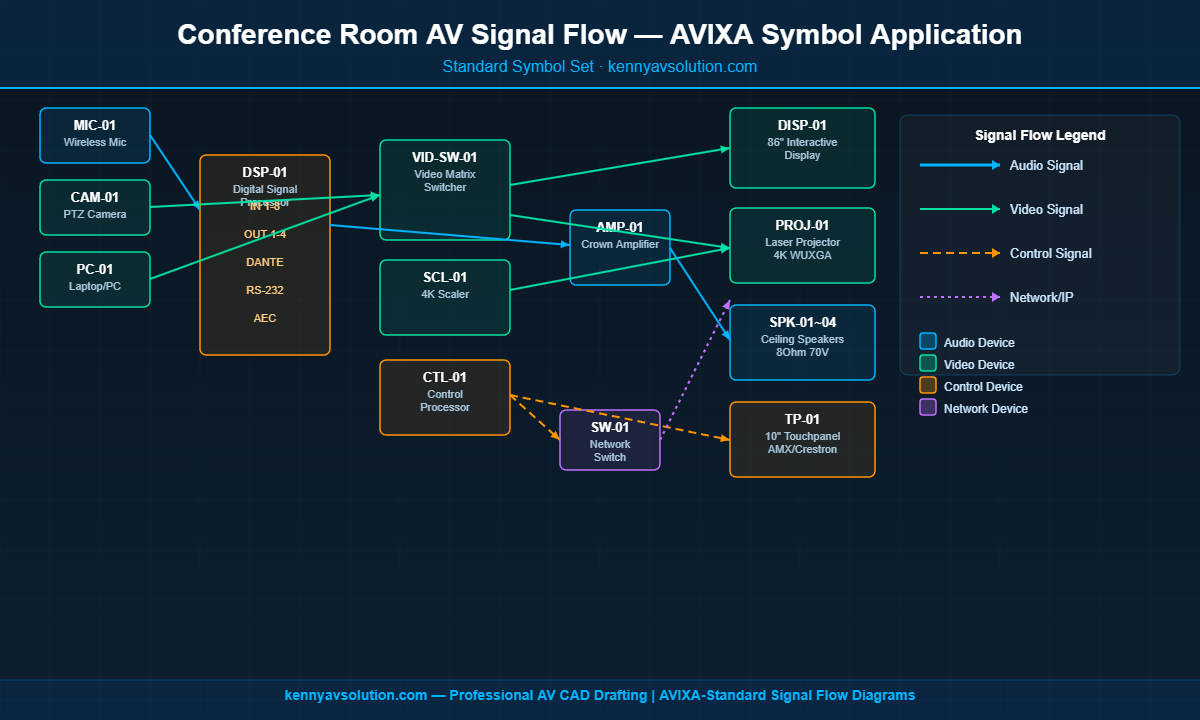
Each symbol should have a device tag (e.g., “SPK-01”, “DSP-01”) that matches your equipment schedule. This cross-referencing makes it easy to trace any device from the drawing to the spec sheet to the cable schedule. You can see this in action in our guide to AV signal flow diagrams.
Where to Get the AVIXA Drawing Symbols Standard
The full ANSI/AVIXA 2M-2010 standard is available directly from the AVIXA website. AVIXA members get discounted access to standards documents. The standard itself includes symbol definitions, drawing conventions, and guidance for documentation packages.
Many popular AV CAD tools — including AutoCAD with AV-specific symbol libraries, D-Tools, and XTEN-AV — also include AVIXA-compliant symbol sets that you can drop directly into your drawings without building them from scratch. This is a major productivity advantage, especially for firms handling multiple projects simultaneously. Check out our full breakdown in Best AV CAD Software in 2026 to see which tools include pre-built AVIXA symbol libraries.
AVIXA Symbols vs. Generic CAD Symbols: What’s the Difference?
A common shortcut in smaller AV shops is to use generic electrical or IT symbols in place of proper AVIXA symbols. While this works in a pinch, it creates problems:
- Confusion with other trades: An electrical symbol repurposed for an AV device can be misread by electricians reviewing the same drawing set.
- Non-standard documentation: If the project ever gets audited or handed to another AV firm, non-standard drawings require a full re-interpretation session.
- Lower perceived professionalism: Clients comparing proposals from multiple AV integrators can tell the difference between a professional CAD package and a rough sketch.
The fix isn’t complex — it just requires building your drawing templates around the AVIXA standard from day one, or working with a CAD drafting partner who already has those templates ready to go. See the complete AV design documentation package guide for what a professional deliverable should look like.
Let Kenny AV Solution Handle Your AV Drawing Documentation
Keeping up with AVIXA standards, managing symbol libraries, and producing complete documentation packages takes time — time that’s often better spent on client relationships and system design. That’s where we come in.
At Kenny AV Solution, we specialize in professional AV CAD drafting using AVIXA-compliant symbols and documentation standards. Whether you need signal flow diagrams, rack elevations, floor plans, or a complete AV design documentation package, we deliver clean, accurate drawings that your installation teams and clients can rely on.
Ready to upgrade your AV documentation? Contact Kenny AV Solution today and let’s talk about your next project.