
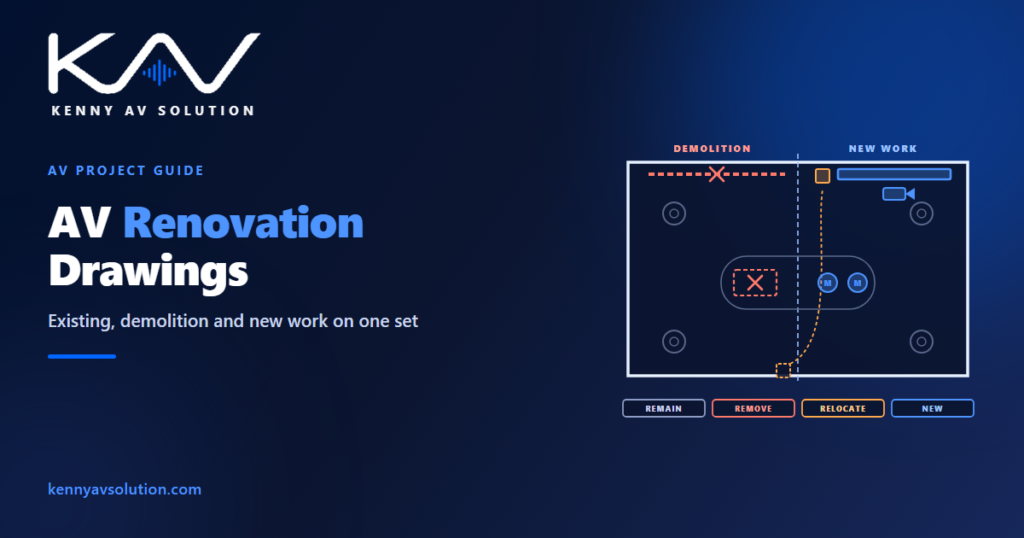
AV renovation drawings document a room that already has a system in it. Most AV work is not new construction. It is a boardroom refresh, a lecture hall upgrade or a floor of meeting rooms brought up to a new standard, usually in a building that stays occupied while the work happens. A new-build set only has to show what will be installed. A renovation set has to show what is there now, what is removed, what stays, what moves and what is new, and if it does not, installers either rip out cable that could have been reused or leave old equipment behind that nobody asked for.
Demolition, the removal of abandoned cable, fire-stopping and work in occupied buildings are governed by local codes, the contract and the building owner’s rules. What follows is common drafting practice; confirm the specific requirements with the project team and the authority having jurisdiction.
Every device needs a status
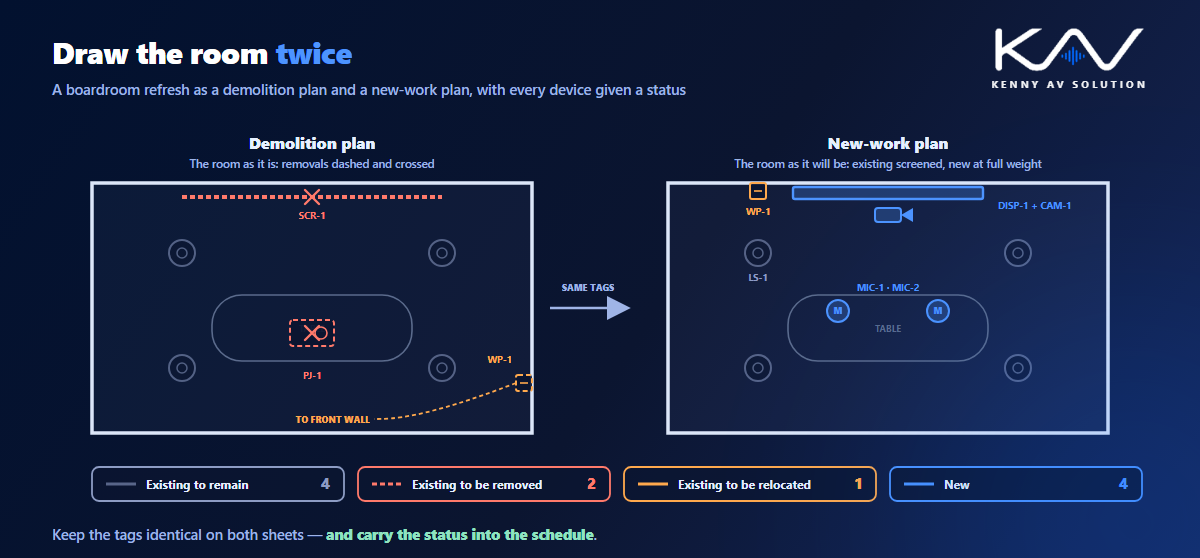
On a renovation set, the tag alone is not enough. Every device on the drawings also needs a status, shown on the symbol and defined in the legend. The four that cover almost every project are:
- Existing to remain — stays in place and stays in service, often reconnected to new equipment.
- Existing to be removed — taken out as part of the work, with its cabling and mounts.
- Existing to be relocated — removed and reinstalled somewhere else, shown at both its old and its new position.
- New — supplied and installed under this contract.
Use the same abbreviations everywhere, put them in the legend with your other drawing standards, and carry the status into the device schedule as its own column. A schedule that lists twelve loudspeakers without saying which four already exist will be priced as twelve new ones.
Separate the demolition plan from the new-work plan
The clearest renovation sets draw each room twice. The demolition plan shows the room as it is today, with the items to be removed drawn dashed and marked. The new-work plan shows the room as it will be, with the existing equipment that remains drawn screened or light and the new work drawn at full weight. Relocated items appear on both: dashed at their old position on the demolition plan, and solid at the new one on the new-work plan.
Two plans can feel like extra work, but they match how the job is done. Removal usually happens first, sometimes by a different crew, and an installer looking at a combined plan has to work out which lines are coming out and which are going in. Keep the device tags identical on both sheets so nothing is lost between them.
The architect’s background for a renovation is often an old drawing that no longer matches the room. Check it before you draw on it, as described in working with architectural backgrounds.
Verify before you reuse
Reusing existing infrastructure is where renovations save money, and where they go wrong. Cable that looks fine may be the wrong category, too long for the new signal, damaged, or terminated in a way nobody recorded. A backbox may be too shallow for the new plate. A ceiling support that held a projector may not be rated for the new display. Every reuse decision depends on something you have not yet confirmed.
- Record what was verified on site and what was assumed, as part of the site survey.
- Mark anything reused but unverified on the drawings, so the installer knows to check it before relying on it.
- Where existing network cable is reused, call for it to be tested to the required standard, as with any structured cabling.
- Give reused cable a new ID in the cable schedule, with a note that it is existing, rather than leaving it off the schedule because it was already there.
Abandoned cable and removed equipment
When equipment comes out, its cable often stays in the ceiling. Many codes require abandoned cable to be removed where it is accessible — in the United States, the National Electrical Code does this for many types of low-voltage and communications cable — and building owners increasingly ask for it regardless, because abandoned cable adds fire load and makes the next renovation harder. Say on the demolition plan which cables are removed back to where, and which are left and why.
Removed equipment needs a destination too. Add a disposition column to the schedule of removed items: returned to the owner, reused elsewhere on the project, or disposed of by the contractor. Flag devices that store data, such as codecs, room PCs, recorders and control processors, so they are wiped or handed back before disposal. Nobody wants to explain why an old meeting room PC with the client’s files on it left in a skip.
Phasing in an occupied building
A renovation rarely gets the building to itself. Meeting rooms are booked, lectures are timetabled, and a client’s main boardroom may be offline for a weekend at most. When the work is phased, the drawings need to show it:
- Which rooms are in each phase, on a key plan.
- Any temporary arrangement that keeps a room working, such as a portable display or a temporary connection to an existing rack.
- Which rack or processor serves which rooms during the changeover, if old and new systems run side by side.
- The cutover sequence for shared equipment, so one room’s upgrade does not take three others down with it.
Who removes what, who supplies what, and who reconnects owner equipment should be written down in the responsibility matrix, not left to the site meeting.
Close the loop with the record drawings
The previous record drawings for the room are now wrong. When the work is complete, the new as-built drawings replace them, and the old set should be marked as superseded rather than left in the same folder. Existing equipment that remained in service belongs on the new as-builts too, with its condition and any changes to its connections. The next renovation will start from these drawings, so they are the best gift this project can leave behind. The handover itself is covered in AV closeout documentation.
Frequently asked questions
What are AV renovation drawings? Drawings for upgrading or replacing an AV system in an existing room. They show what is there now, what is removed, what remains, what is relocated and what is new, usually on a separate demolition plan and new-work plan.
How do you show existing and new AV equipment on the same drawings? Give every device a status, such as existing to remain, existing to be removed, existing to be relocated or new, and show it on the symbol and in the schedule. Existing equipment is usually drawn screened, removed items dashed, and new work at full line weight.
Should a renovation set have a separate demolition plan? Usually, yes. A demolition plan showing what comes out, and a new-work plan showing the finished room, are easier to build from than one combined plan, because removal often happens first and sometimes by a different crew.
Can existing AV cabling be reused? Often, but only after it has been verified: the right type and category, within the length limits of the new signal, undamaged and properly terminated. Reused network cable should be tested, and reused cable should still appear in the cable schedule.
What happens to AV equipment removed during a renovation? The drawings or schedule should say whether each item is returned to the owner, reused elsewhere or disposed of. Devices that store data, such as codecs and room PCs, should be wiped or handed back before disposal.
Need drawings for an AV upgrade?
Kenny AV Solution drafts AV documentation for integrators, consultants and design-build teams worldwide — demolition and new-work plans, device schedules with status and disposition, phasing plans, cable schedules that separate reused and new cable, and updated record drawings, all drawn to your standards and your title block. See our drafting services, get an existing set checked with a drawing set review, or schedule a quick call — we come back with a quote and timeline within one business day.