
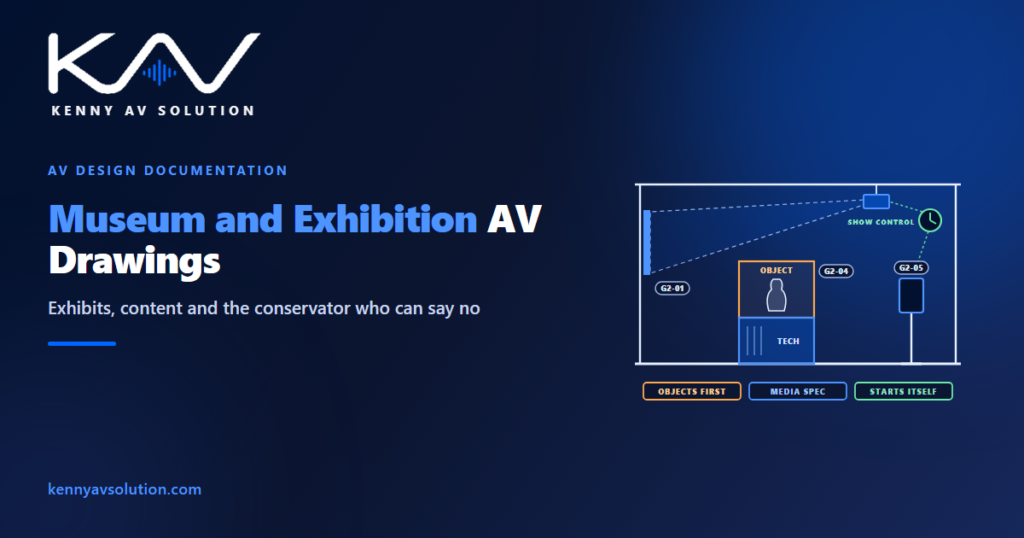
Museum AV drawings are drawn for a building whose real client is not a person. In most AV work the equipment serves the people in the room. In a museum it serves the objects and the story, and both of those have somebody speaking for them who outranks AV: the exhibit designer, who decides what the visitor experiences, and the conservator, who decides what is allowed anywhere near the collection.
Conservation requirements — light, heat, vibration, materials near objects — are set by the museum’s conservator and, for loaned items, by the lender. Structural matters and any consent for work to a protected building belong to the relevant engineers and authorities. What follows is what AV has to document so those people can approve it.
The exhibit designer leads, and AV follows
On a corporate job AV designs a room. On a museum project, AV equips somebody else’s design.
The exhibit designer and interpretive planner own the visitor experience — the route through the galleries, what each exhibit says, where the visitor stands, what they see first. AV is one of several contributors to that, alongside graphics, lighting, casework and content. The design is theirs, and the drawings have to be organised around it.
The practical consequence is numbering. The exhibit designer will have a scheme — gallery and exhibit references like G2-04 — and that scheme is what everybody on the project uses in meetings, on the programme and in the content contracts. Key every AV device to the exhibit reference, not just to a room name or an AV tag. When the curator asks what happens at G2-04, the answer should be one lookup, not a cross-referencing exercise between your set and theirs.
Work to their drawings as the background, record which revision you drew against, and expect it to move. Exhibition design keeps developing much later than architecture does, and the discipline in working with architectural backgrounds applies to the exhibit layout just as it does to the building.
Content is a separate deliverable, from a separate company
This is the interface that fails most often, and it is almost entirely a documentation failure.
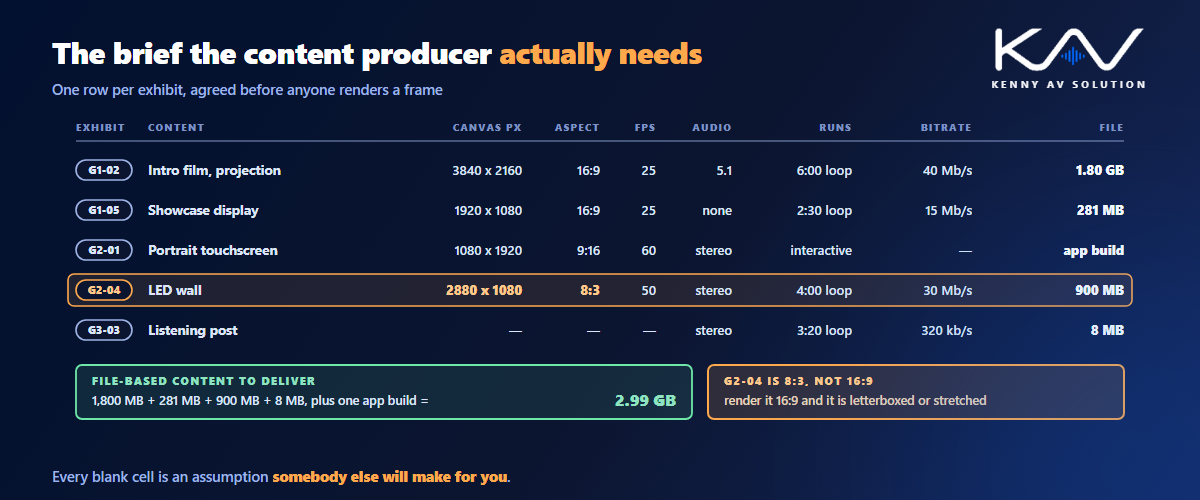
The film in the introductory gallery, the interactive on the touchscreen, the soundscape in the listening post — these are usually produced by a content company working to their own contract. They are not AV, and they will produce exactly what they are told to. If nobody tells them the precise format each device needs, they will make a sensible assumption, and a sensible assumption is how a 16:9 film ends up letterboxed on a wall that is not 16:9.
So the AV set needs a media specification per exhibit: the resolution and aspect ratio of the canvas, the frame rate, the audio channel format, whether it loops or is triggered, how long it runs, whether it is synchronised with anything else, and where and how files are delivered. That is not a spec sheet for the player. It is the brief for the content producer, and it has to exist before they start rendering.
The signal path from player to display belongs in the ordinary signal flow diagrams. The media specification is the part that crosses the contract boundary, which is why it needs to be its own schedule rather than something inferred from the equipment list.
Objects outrank equipment
This is the constraint with no equivalent elsewhere, and the conservator has a veto.
Light damages sensitive material cumulatively, so conservators set limits on how much light certain objects may receive — for the most sensitive materials, such as works on paper and textiles, a commonly cited limit is around 50 lux. A projector’s spill, a display’s glow and the reflection off a bright screen all count toward that, and they are easy to overlook because AV thinks of them as its own light rather than as exposure. Where projection is near an object, the projector section has to show where the light goes, not just where the image lands.
Heat is the second issue. Equipment inside or beside a showcase affects the conditions around the object, and a sealed case is frequently designed to hold a stable microclimate. The usual answer is to keep AV out of the object compartment entirely, in a separate technical compartment with its own ventilation, and to state the heat load so the people responsible for the environment can judge it — the same number described in rack power and heat load, at a much smaller scale and with far less tolerance.
Vibration and materials follow. A loudspeaker bolted to a case holding a fragile object is a conversation with the conservator before it is a design. Some materials used in casework can release compounds that harm objects, which is why many museums test materials before they go into a showcase.
And where the building itself is historic, what you may fix to is restricted as well. That constraint is the one covered in house of worship AV drawings, and it applies here unchanged.
The building starts itself every morning
A museum is operated by front-of-house staff, not by AV technicians, and the system has to respect that.
Every day the galleries come to life before the doors open and go dark after they close. Projectors warm up, displays wake, players start their content, audio comes up — and in the evening the whole thing goes down again. Nobody on the floor should have to understand how. That is the job of show control: a scheduled, sequenced start-up and shutdown, usually with a single fallback control for staff when something needs restarting.
That sequence is design, and it belongs on the drawings. Document the order things power on and off, the delays between stages, and what staff can and cannot do. Staging matters physically as well as operationally: bringing an entire gallery up at once is a large simultaneous load, and some devices need their source present before the display wakes. A drawn sequence is also the only way the next person understands why the system behaves as it does.
The same thinking covers failure. When a player dies at 10:15 on a Saturday, what does the visitor see? A black screen, a holding image, or nothing at all because the exhibit has a fallback? Write it down.
Hidden, but maintained by people who are not AV
Museum AV is concealed in casework, behind graphic panels, above ceilings and inside plinths. Visitors should see the content and never the kit. That is correct, and it creates a maintenance problem that has to be designed out on paper.
Players get swapped, projectors need filters and lamps or light engines serviced, touchscreens get replaced after a school group. If any of those tasks means dismantling an exhibit or unscrewing a graphic panel, it will be done badly or not at all. So show how each item comes out: the access hatch, the removable panel, the clearance behind the casework, and who is expected to do it.
Casework is fabricated off site to shop drawings, so all of this has to be agreed before the joiner builds anything — the cutout, the ventilation path, the cable route, the access panel. That is the ordinary shop drawing interface with more at stake, because remaking a finished showcase is expensive and remaking one that holds a loaned object is a negotiation.
Sound needs the same care. Galleries are open plan, and one exhibit’s soundtrack bleeds into the next. Directional devices, handsets, localised audio and careful loudspeaker coverage all help, but the real decision is which exhibits are allowed to make sound at all, and that is an interpretive decision to settle before anyone places a loudspeaker.
Temporary galleries need two layers of drawings
Permanent galleries change every decade. Temporary exhibition galleries change every few months, and that calls for a different structure.
The building provides a fixed infrastructure: floor boxes, ceiling power and data points, a rigging grid, a backbone to the head-end. Each exhibition then arrives with its own layout, its own devices and its own content, uses some of that infrastructure and ignores the rest, and leaves again.
So document it as two layers. The infrastructure layer is drawn once, carefully, and kept current: every point, what it provides, and its capacity. Each exhibition is then drawn as an overlay that references the infrastructure by point number and adds only what is specific to that show. The next exhibition starts from the infrastructure layer, not from the last show’s as-builts.
This is the same reasoning as the containment and riser backbone in any building, taken further: in a temporary gallery the backbone is the only thing that stays.
What a museum AV set contains
A conventional set, organised around exhibits rather than rooms:
- Gallery plans with every device keyed to the exhibit designer’s references.
- An exhibit schedule listing, per exhibit, the devices, the content, and the responsible party.
- A media specification for the content producer: canvas, frame rate, audio format, loop or trigger, sync and file delivery.
- Casework and showcase interface details with technical compartments, ventilation, heat load and access.
- Projection sections showing the image, the spill and any nearby objects.
- A show control sequence for daily start-up and shutdown, with staff controls and failure behaviour.
- Infrastructure drawings for temporary galleries, with each exhibition as an overlay.
- A cable schedule keyed to exhibit references.
- As-builts, which in a museum outlive most of the people who installed the system.
Keep the conventions consistent with your documented AV drawing standards so the set reads the same as everything else you issue, and treat every interface — exhibit designer, content producer, casework maker, lighting designer, conservator — the way AV trade coordination describes. There are more parties than usual, and several of them can say no. When the project is finished, an accurate as-built set is what lets the museum maintain a system nobody on staff designed.
Frequently asked questions
What makes museum AV drawings different from other AV drawings? AV equips somebody else’s design. The exhibit designer owns the visitor experience, the conservator can veto anything near the collection, content comes from a separate company, and the whole system has to start and stop itself daily for staff who are not AV technicians. The drawings are organised around exhibits and interfaces rather than rooms.
What is a media specification and who needs it? It is the brief for the content producer: for each exhibit, the canvas resolution and aspect ratio, frame rate, audio channel format, loop length or trigger behaviour, synchronisation and file delivery. Without it, content is produced to assumptions, and the most common result is footage made at the wrong aspect ratio for the display it is going on.
How does conservation affect AV design in a museum? Light, heat, vibration and materials near objects are all controlled by the conservator. Projector spill and screen glow count toward light exposure, equipment heat affects showcase conditions, and loudspeakers on casework transmit vibration. The usual approach is to keep AV out of object compartments and to state heat loads and light paths on the drawings for approval.
Why document show control in a museum? Because the galleries start up and shut down every day without an AV technician present. The sequence, the delays between stages, the staff controls and the behaviour when something fails are all design decisions, and a drawn sequence is the only way anyone maintaining the system later will understand it.
How should temporary exhibition galleries be documented? As two layers. Draw the permanent infrastructure once — floor boxes, ceiling points, rigging, backbone — with each point numbered and its capacity stated. Then draw each exhibition as an overlay referencing those point numbers, so every new show starts from the infrastructure rather than from the previous show’s as-builts.
Need museum AV drawings drafted?
Kenny AV Solution produces AV drawing sets in AutoCAD for integrators, exhibit AV specialists and consultants worldwide — gallery plans keyed to exhibit references, exhibit and media specification schedules, casework interface details, projection sections, show control sequences, infrastructure and overlay drawings for temporary galleries, cable schedules and as-builts, drawn to your standards and your title block. Send us the exhibit designer’s layout and your device list, and we will produce a set the content producer and the conservator can both work from. See our AV CAD drafting services, grab the free AV CAD Drafting Standards Checklist, or schedule a quick call — we come back with a quote and timeline within one business day. For the underlying documentation standards, AVIXA is the reference worth having on the shelf.