
When you’re bidding on a commercial AV project — whether it’s a corporate boardroom, a university lecture hall, or a multi-room conference center — one thing separates the professionals from the guessers: a complete AV design documentation package.
Proper documentation isn’t just paperwork. It’s the blueprint that guides your installation crew, protects you during scope disputes, satisfies the general contractor, and gives your client confidence that you know what you’re doing. But what exactly belongs in a complete AV documentation package? Let’s break it down — drawing by drawing, document by document.
What Is an AV Design Documentation Package?
An AV design documentation package is a full set of technical drawings, schedules, and written specifications that describe every component of an audio-visual system — and exactly how those components are installed, connected, and configured.
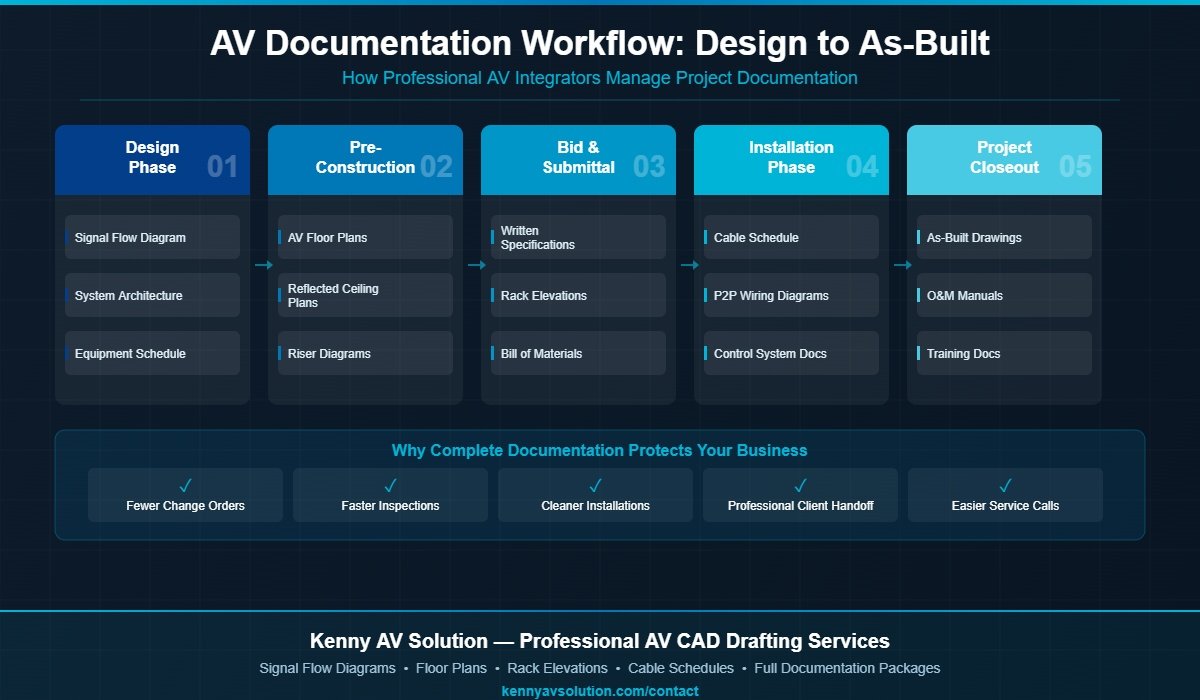
Think of it as the equivalent of a mechanical or electrical drawing set, but tailored specifically for AV systems. A well-structured package covers everything from signal routing and cable paths to rack layouts and programming logic. For AV integrators, having this documentation ready before installation begins means fewer change orders, smoother inspections, and a cleaner handoff to the client at project closeout.
Industry standards from AVIXA (the Audiovisual and Integrated Experience Association) provide guidance on what documentation should look like, but in practice, the exact contents of a package vary by project type, contract requirements, and client expectations. This guide walks through every major component you should know about.
Core Drawings in an AV Documentation Package
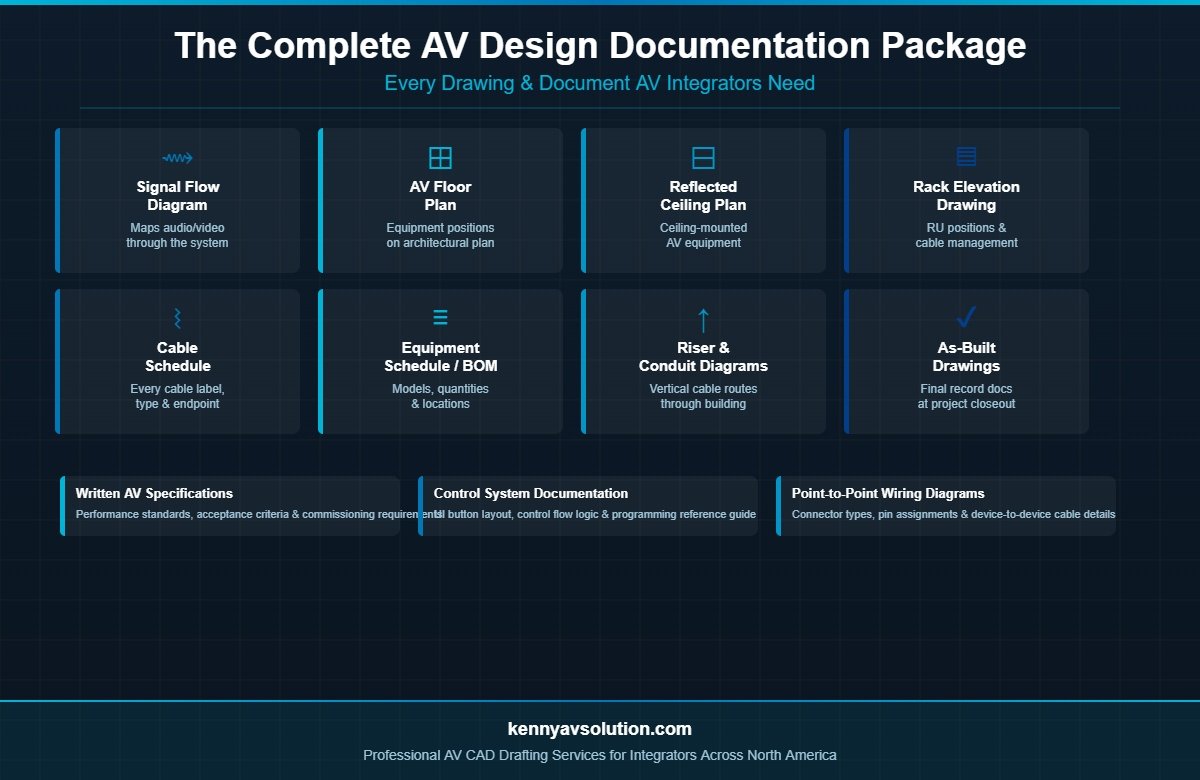
1. AV Signal Flow Diagrams
A signal flow diagram is often the first document created in the design phase. It maps how audio and video signals travel through the system — from sources like cameras, microphones, and media players — through switchers, amplifiers, and processors — out to displays, speakers, and recording systems.
Signal flow diagrams give the entire project team a high-level view of the system’s logic before a single cable is pulled. They’re also essential for DSP programming, troubleshooting, and training end users after installation.
2. AV Floor Plans
AV floor plans show where equipment is physically located within each room. On these drawings, you’ll see the positions of displays, speakers, cameras, control panels, and rack locations — all overlaid on an architectural floor plan base.
These are essential for coordinating with other trades. Electricians need to know where to rough in power and data outlets. Low-voltage contractors need conduit stub locations. The general contractor needs to know if any wall blocking or structural support is required for mounting.
For a detailed breakdown of floor plan documentation, see our guide: AV Floor Plans vs Reflected Ceiling Plans: What AV Integrators Need to Know.
3. Reflected Ceiling Plans (RCP)
A reflected ceiling plan (RCP) shows what’s happening overhead. For AV systems, this includes ceiling-mounted speakers, projectors, cameras, microphones, and motorized screens. The RCP is drawn as if you’re looking up at the ceiling from above — critical for coordinating with lighting, HVAC, and structural trades.
Projector throw distances, speaker coverage zones, and camera field-of-view angles are all best validated on an RCP. Without this drawing, you risk ceiling conflicts and last-minute repositioning that delays your install.
4. AV Rack Elevation Drawings
Rack elevation drawings provide a detailed front-view diagram of every piece of rack-mounted equipment — in the correct order, at the correct rack unit (RU) position. These drawings enable your team to pre-build racks offsite with confidence, ensuring that power, cooling, and cable management are all accounted for before the rack ever arrives on site.
A professional rack elevation includes equipment model numbers, RU sizing, blank panel placement, power distribution unit (PDU) positions, and ventilation notes. Some integrators also include rear-view elevations showing cable entry points and patch panel layouts.
5. Riser and Conduit Diagrams
For multi-floor or multi-room projects, riser diagrams show how cables and conduit travel through the building — vertically through floor penetrations and horizontally through walls and ceiling cavities. These drawings are critical for coordination with the structural engineer and general contractor, especially in existing buildings where conduit pathways are limited.
Conduit diagrams detail the size, material, and routing path of every conduit run, along with pull-box locations and fill calculations. Without these, your low-voltage contractor is making educated guesses — and guesses cost money.
Supporting Documents in a Complete AV Package
Beyond core drawings, a complete AV documentation set includes several supporting documents that are just as important to a successful project.
AV Cable Schedule
A cable schedule is a tabular document listing every cable in the system: cable type, source endpoint, destination endpoint, label identifier, length estimate, and any special notes. It’s your installation team’s reference during the cable-pull phase — and your QA tool during testing and commissioning.
Without a cable schedule, you’re relying on memory and field notes. With one, every termination is documented, labeled consistently, and verifiable against the drawings.
Equipment Schedule / Bill of Materials
An equipment schedule lists every device in the system by manufacturer, model number, quantity, and room location. This document feeds directly into your purchasing workflow and your client’s asset register at project closeout. It also serves as the basis for warranty tracking and future service planning.
Written AV Specifications
Written specifications describe the performance standards, installation requirements, and acceptance criteria for the AV system. They answer questions like: What signal-to-noise ratio must the audio system achieve? What video resolution must displays support? What does system commissioning and sign-off look like?
Written specs are often required for public-sector projects and design-bid-build contracts where a consultant is reviewing submittals on behalf of the owner. Even on smaller commercial projects, they establish clear expectations and protect both sides of the contract.
Point-to-Point Wiring Diagrams
Where signal flow diagrams show the system at a high level, point-to-point (P2P) wiring diagrams get into the details. They show the exact cable connection between two specific devices — including connector types, pin assignments, and termination notes. P2P diagrams are especially important for custom signal processing, DSP programming reference, and post-installation troubleshooting.
Control System Documentation
If the project includes a control system — Crestron, Extron, AMX, QSC, or similar — the documentation package should include a control flow diagram and user interface (UI) button layout. This document shows the logic behind every button press: which devices are switched, which macros fire, which presets are recalled.
Control system documentation is invaluable during programming, commissioning, and when training end users. It’s also what your service tech will need when a support call comes in six months after installation.
As-Built Drawings: The Final Piece
Every documentation package has a design phase version and a record version. As-built drawings are updated at project closeout to reflect any changes made during installation — moved equipment, re-routed cables, substituted gear, added outlets.
As-built drawings are the documents that live in the client’s facility for the life of the system. They’re what the next integrator will rely on when a service call comes in years from now. Delivering as-builts is a hallmark of a professional AV firm — and increasingly, it’s a contractual requirement.
Why a Complete Documentation Package Matters
Incomplete or missing AV documentation is one of the leading causes of project problems in the integration industry:
- Change orders — Scope creep is harder to dispute without drawings that clearly define what was agreed upon.
- Installation errors — Crews make costly assumptions when they don’t have detailed plans to reference.
- Failed inspections — Authorities Having Jurisdiction (AHJs) increasingly require AV drawing submittals on commercial projects.
- Client dissatisfaction — A project that looks disorganized on paper signals disorganization in execution.
- Service nightmares — Without as-builts, every service call starts from scratch.
For AV integrators looking to move upmarket — into larger corporate, educational, or government projects — professional documentation isn’t a nice-to-have. It’s a baseline expectation.
Need Help with Your AV Documentation Package?
Creating a complete AV design documentation package takes time, specialized software (AutoCAD, Visio, D-Tools, XTEN-AV), and deep knowledge of AV standards and installation requirements. If your team is stretched thin on design work, or you’re ready to deliver higher-quality documentation without adding in-house CAD staff, Kenny AV Solution is here to help.
We provide professional AV CAD drafting services for integrators across North America — including signal flow diagrams, floor plans, rack elevations, cable schedules, riser diagrams, and full project documentation packages. Our drawings are clean, accurate, and ready for submittal or field installation.
Contact Kenny AV Solution today to discuss your next project. Whether you need a single drawing or a complete AV documentation package from scratch, we’ll get it done right — on time and on budget.